

keyboard
Easiest and Fastest - Azhagi's Tamil transliteration scheme
Azhagi+ and Azhagi - Unique, User-friendly and Feature-rich Indian languages Word processors.
NOT 'yet another' typing tools. Quite 'different' and special.
Direct transliteration/typing in ANY windows application in Tamil, Hindi, Sanskrit, Telugu, Kannada, Malayalam, Marathi, Gujarati, Bengali, Punjabi, etc. But, not just that. You can do much more. For instance, you can change the existing key mappings, create and add your own keyboard layouts with your own key mappings (or with the key mappings of any Indian language font you are accustomed to) and start typing in them, etc., etc.
Azhagi - its 'different' - providing (since 2000) a unique Tamil transliteration scheme - natural and intuitive, easy and flexible, simple and straightforward, fast and friendly - allowing you to transliterate more in less time - and thus, increasing your productivity multifold.
This unique userfriendliness* of Azhagi's Tamil transliteration scheme has been explained here (thanks to Sri. A.K.Rajagopalan, editor of mazhalaigal.com) and also as part of the Azhagi write-up (in Tamil) below. Additionally, in the write-up below, you can read details about Azhagi's few other very special, unique and useful tools for Tamil, like:
Please visit ards.php for comprehensive details on the above power-tools.
Note: If you wish to read the features of Azhagi fully in English, please visit feats.php
அழகி - புதுமை எளிமை வலிமை - வருடம் 2000 முதல்...
அழகி (azhagi.com) - தனித்துவம் வாய்ந்த ஒரு பன்முகப் பயன்பாட்டுத் தமிழ் மென்பொருள். முற்றிலும் இலவசம்.
 குறைந்த நேரத்தில் நிறைய தட்டச்சிட வகை செய்யும் தனிச்சிறப்பு மிக்க ஆங்கிலம்-தமிழ் ஒலியியல் சொல் இணைப்பு
'ஸத்' ஒலிபெயர்ப்பு
'மாற்று' ஒலிபெயர்ப்பு
'இரு திரை' ஒலிபெயர்ப்பு
'தானியங்கி' ஒலிபெயர்ப்பு
மேலும் விவரங்களுக்கு, கீழ்வருவனவற்றைப் படிக்கவும்:
அழகி, விண்டோஸின் 'அனைத்து' செயலிகளிலும் (in 'all' windows applications) நேரடியாகவே தட்டச்சு செய்ய வல்லது. ஒலியியல் (phonetic/transliteration), தமிழ்நெட்99, தமிழ்'தட்டச்சு என்ற 3 (மூன்று) விசைப்பலகை முறைகளிலும், 'திஸ்கி' எழுத்துருவில் மட்டுமில்லாது பயன்மிகு 'யூனிகோட்' எழுத்துருவிலும், எளிதாய் தட்டச்சு செய்ய வல்லது.
ஒலியியல் முறையில், தமிழில் மட்டுமல்லாது, பிற இந்திய மொழிகளான ஹிந்தி (சம்ஸ்கிருதம், மராத்தி, கொங்கனி, ..., ...), தெலுங்கு, கன்னடம், மலையாளம், குஜராத்தி, பெங்காலி (வங்காளம்), பஞ்சாபி, ஒரியா, அசாமீஸ் முதலியவற்றிலும் தட்டச்சு செய்ய வல்லது. விவரங்களுக்கு, multi.html பக்கம் பார்க்கவும்.
மிகவும் சுலபமான, வேகமான, இடத்திற்கேற்ப மாறி அமையும் (Easy, fast and flexible) ஆங்கிலம்-தமிழ் ஒலியியல் சொல் இணைப்பே (English-to-Tamil Phonetic Key'mappings) அழகியின் தனிச்சிறப்பு* ஆகும். இத்தகைய தனித்தன்மை வாய்ந்த 'ஒலியியல் அமைப்பு' (transliteration scheme) மூலம், உங்கள் தமிழ் தட்டச்சு செயல்திறனை (productivity) அழகி இயல்பாய் அதிகரிக்கிறது (அதாவது, குறைந்த நேரத்தில் நிறைய தட்டச்சு செய்ய உதவுகிறது). உதாரணத்திற்கு, 'ஸ்ரீதர்' என்று தட்டச்சிட sridhar, sreedhar, Shreedhar என்று பல வகைகளில் டைப் செய்யலாம் (flexible transliteration). 'நீங்க', 'விஸ்வம்', 'நன்றி', 'கஸ்தூரி', 'பொய்', 'மஞ்சு', 'கற்று' என்று தட்டச்சிட neenga, viswam, nandri, kasthoori, poi, manju, katru என்று அப்படியே இயல்பாக டைப் செய்திடலாம் (easy, natural, intuitive and straightforward transliteration). இது போன்ற உதாரணங்கள் இன்னும் பல. அவற்றை, அழகியை உபயோகிக்கையில் நீங்களே அறிந்துணர்வீர்கள்.
எனது நன்றிகள்:
(*) This uniqueness of Azhagi is amongst non-freeform transliterators (for details on free-form transliterators, click here) only.
பல தனித்தன்மை வாய்ந்த வசதிகள்/கருவிகள் அழகியில் உண்டு:
மேற்கூறிய சிறப்பம்சங்களால், தனி நபர்கள், உயர்தர நிறுவனங்கள் என்று அழகியின் வாடிக்கையாளர்கள், உலகில் பல்லாயிரம். அது மட்டுமல்லாது, சிறுவர்களும், மிகவும் வயதானவர்களும், தமிழ் பேச ஆனால் எழுத/படிக்க இயலாதவரும், தமிழ் தட்டச்சிடத் துடிக்கும் வேற்று மொழியினரும், கணினி என்றாலே ஒன்றுமே தெரியாதவரும் கூட, எளிதில் விரைவாக விரும்பித் தமிழ் கற்று, ஓரிரு தினங்களிலேயே வேகமாகத் தட்டச்சிட, உலகின் முதலாம் 'இரு திரை' ஒலிபெயர்ப்பு கருவி பெரிதும் உதவுகிறது என்றால் அது மிகையாகாது.
‘இரு திரை’ மற்றும் ‘ஒரு திரை’ ஒலிபெயர்ப்பு - அழகியில்
அழகியின் உள்-அமைந்த (in-built) திஸ்கி எடிட்டரைக் கொண்டு, 'ஒரு திரை' மட்டுமல்லாது, 'இரு திரை' அமைப்பிலும், தமிழில் ஒலிபெயர்ப்பு செய்யலாம்.
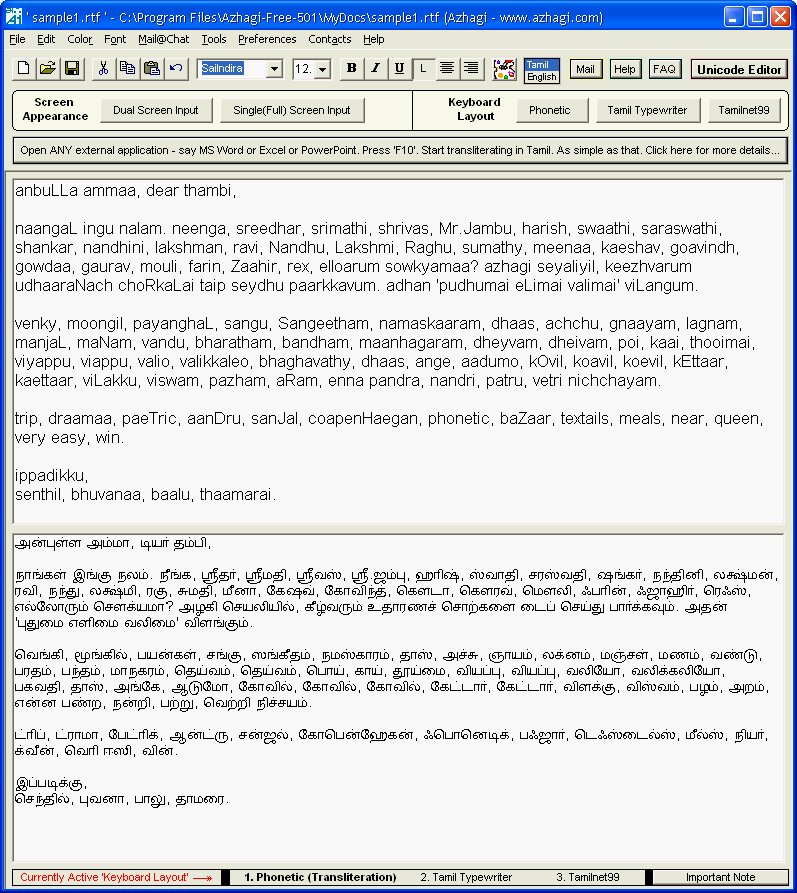
மேலே நீங்கள் காண்பது ‘இரு திரை’ ஒலிபெயர்ப்பு
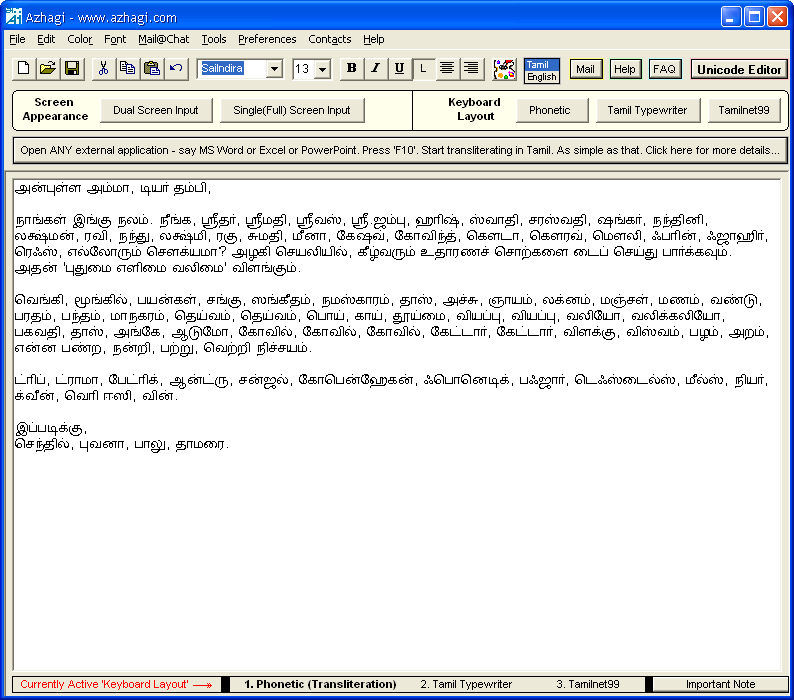
மேலே நீங்கள் காண்பது ‘ஒரு திரை’ ஒலிபெயர்ப்பு
அழகியின் பன்மொழி யூனிகோட் எடிட்டர்
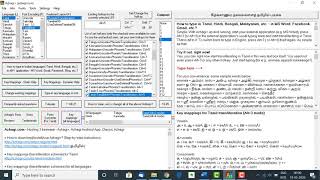
அழகியைத் துவக்கிய பின், 'F8' விசையை அழுத்தியோ அல்லது 'Unicode Editor' என்று தலைப்பிடப்பட்ட சிவப்பு நிற பட்டனைக் க்ளிக் செய்தோ, அழகியின் உள்-அமைந்த (in-built) யூனிகோட் எடிட்டரைத் திரையில் காணச் செய்யலாம்.
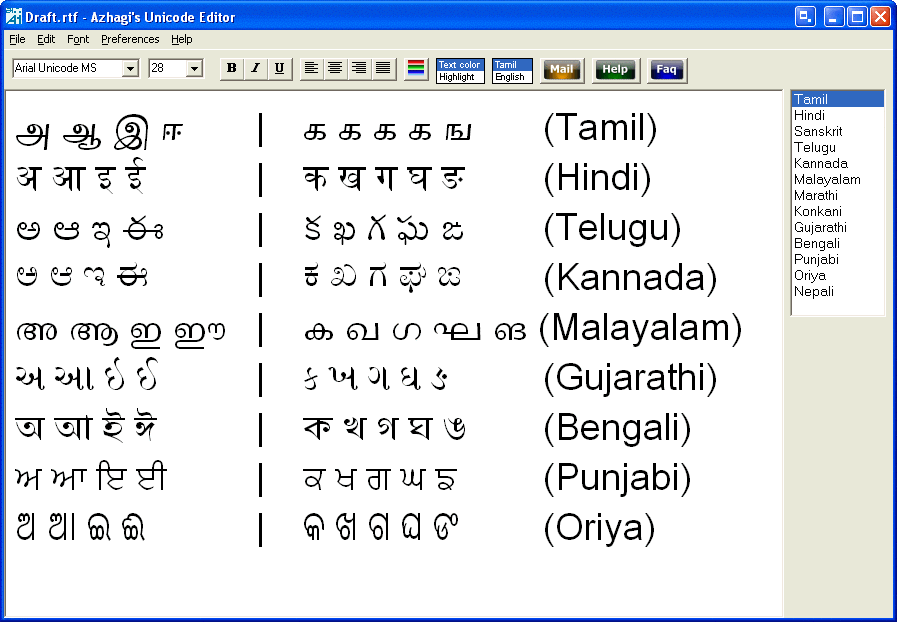
மேலே நீங்கள் காண்பது அழகியின் பன்மொழி யூனிகோட் எடிட்டர்
தமிழில் நேரடி ஒலிபெயர்ப்பு/தட்டச்சு - எல்லா செயலிகளிலும்
அழகியைப் பயன்படுத்தி, வெறும் 'F10' விசையை அழுத்தி, எங்கு வேண்டுமானாலும் - MS-Word, Excel, PowerPoint, Adobe PageMaker, Photoshop, Outlook Express, Yahoo! Messenger, Hotmail, GoogleTalk போன்ற எல்லா செயலிகளிலும் - நேரடி ஒலிபெயர்ப்பு/தட்டச்சு வெகு எளிதாகச் செய்யலாம்.
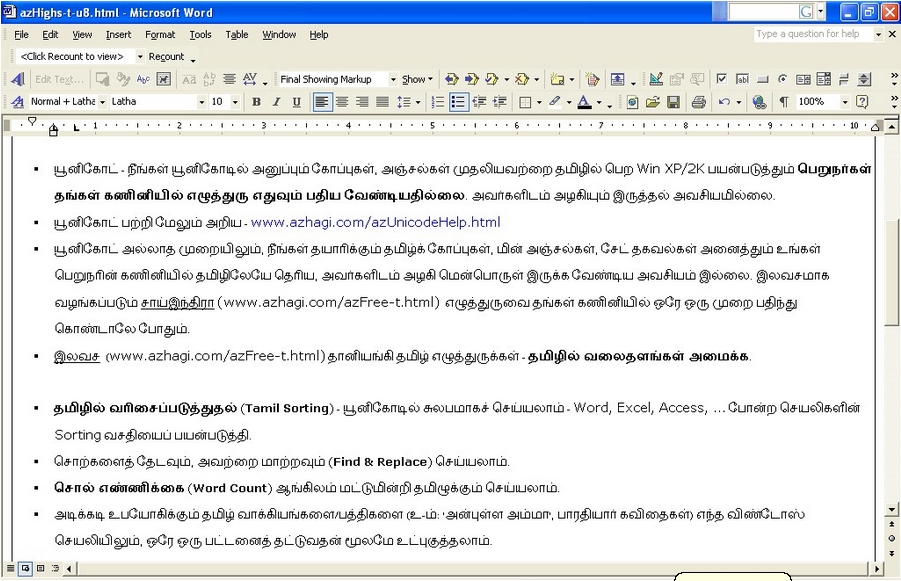
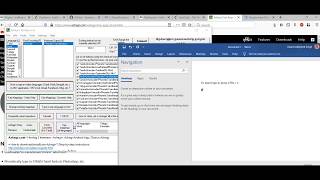
மேலே நீங்கள் காண்பது ‘நேரடி' ஒலிபெயர்ப்பு - 'எம்.எஸ்.வேர்ட்' - இல்.
azhagi.com/contacts.html
NOT 'yet another' typing tools. Quite 'different' and special.
Direct transliteration/typing in ANY windows application in Tamil, Hindi, Sanskrit, Telugu, Kannada, Malayalam, Marathi, Gujarati, Bengali, Punjabi, etc. But, not just that. You can do much more. For instance, you can change the existing key mappings, create and add your own keyboard layouts with your own key mappings (or with the key mappings of any Indian language font you are accustomed to) and start typing in them, etc., etc.
Azhagi - its 'different' - providing (since 2000) a unique Tamil transliteration scheme - natural and intuitive, easy and flexible, simple and straightforward, fast and friendly - allowing you to transliterate more in less time - and thus, increasing your productivity multifold.
This unique userfriendliness* of Azhagi's Tamil transliteration scheme has been explained here (thanks to Sri. A.K.Rajagopalan, editor of mazhalaigal.com) and also as part of the Azhagi write-up (in Tamil) below. Additionally, in the write-up below, you can read details about Azhagi's few other very special, unique and useful tools for Tamil, like:
Please visit ards.php for comprehensive details on the above power-tools.
Note: If you wish to read the features of Azhagi fully in English, please visit feats.php
அழகி - புதுமை எளிமை வலிமை - வருடம் 2000 முதல்...
அழகி (azhagi.com) - தனித்துவம் வாய்ந்த ஒரு பன்முகப் பயன்பாட்டுத் தமிழ் மென்பொருள். முற்றிலும் இலவசம்.
குறைந்த நேரத்தில் நிறைய தட்டச்சிட வகை செய்யும் தனிச்சிறப்பு மிக்க ஆங்கிலம்-தமிழ் ஒலியியல் சொல் இணைப்பு 'ஸத்' ஒலிபெயர்ப்பு 'மாற்று' ஒலிபெயர்ப்பு 'இரு திரை' ஒலிபெயர்ப்பு 'தானியங்கி' ஒலிபெயர்ப்பு மேலும் விவரங்களுக்கு, கீழ்வருவனவற்றைப் படிக்கவும்:
அழகி, விண்டோஸின் 'அனைத்து' செயலிகளிலும் (in 'all' windows applications) நேரடியாகவே தட்டச்சு செய்ய வல்லது. ஒலியியல் (phonetic/transliteration), தமிழ்நெட்99, தமிழ்'தட்டச்சு என்ற 3 (மூன்று) விசைப்பலகை முறைகளிலும், 'திஸ்கி' எழுத்துருவில் மட்டுமில்லாது பயன்மிகு 'யூனிகோட்' எழுத்துருவிலும், எளிதாய் தட்டச்சு செய்ய வல்லது.
ஒலியியல் முறையில், தமிழில் மட்டுமல்லாது, பிற இந்திய மொழிகளான ஹிந்தி (சம்ஸ்கிருதம், மராத்தி, கொங்கனி, ..., ...), தெலுங்கு, கன்னடம், மலையாளம், குஜராத்தி, பெங்காலி (வங்காளம்), பஞ்சாபி, ஒரியா, அசாமீஸ் முதலியவற்றிலும் தட்டச்சு செய்ய வல்லது. விவரங்களுக்கு, multi.html பக்கம் பார்க்கவும்.
மிகவும் சுலபமான, வேகமான, இடத்திற்கேற்ப மாறி அமையும் (Easy, fast and flexible) ஆங்கிலம்-தமிழ் ஒலியியல் சொல் இணைப்பே (English-to-Tamil Phonetic Key'mappings) அழகியின் தனிச்சிறப்பு* ஆகும். இத்தகைய தனித்தன்மை வாய்ந்த 'ஒலியியல் அமைப்பு' (transliteration scheme) மூலம், உங்கள் தமிழ் தட்டச்சு செயல்திறனை (productivity) அழகி இயல்பாய் அதிகரிக்கிறது (அதாவது, குறைந்த நேரத்தில் நிறைய தட்டச்சு செய்ய உதவுகிறது). உதாரணத்திற்கு, 'ஸ்ரீதர்' என்று தட்டச்சிட sridhar, sreedhar, Shreedhar என்று பல வகைகளில் டைப் செய்யலாம் (flexible transliteration). 'நீங்க', 'விஸ்வம்', 'நன்றி', 'கஸ்தூரி', 'பொய்', 'மஞ்சு', 'கற்று' என்று தட்டச்சிட neenga, viswam, nandri, kasthoori, poi, manju, katru என்று அப்படியே இயல்பாக டைப் செய்திடலாம் (easy, natural, intuitive and straightforward transliteration). இது போன்ற உதாரணங்கள் இன்னும் பல. அவற்றை, அழகியை உபயோகிக்கையில் நீங்களே அறிந்துணர்வீர்கள்.
எனது நன்றிகள்:
(*) This uniqueness of Azhagi is amongst non-freeform transliterators (for details on free-form transliterators, click here) only.
பல தனித்தன்மை வாய்ந்த வசதிகள்/கருவிகள் அழகியில் உண்டு:
- SAT Transliteration: அழகியின் 'ஒலியியல் அமைப்பு' எப்படி இயல்பாகவே உங்கள் தமிழ் தட்டச்சு செயல்திறனை வெகுவாய் அதிகரிக்கிறது (அதாவது, குறைந்த நேரத்தில் நிறைய தட்டச்சு செய்ய உதவுகிறது) என்பது பற்றி ஏற்கெனவே மேலே சொல்லப்பட்டுள்ளது. இச்செயல்திறனை மேலும் பன்மடங்கு அதிகரிக்க உதவுவதே SAT ஒலிபெயர்ப்பு முறை ஆகும். இதன் மூலம்,
- 'aditya' என்று டைப் செய்தாலே 'ஆதித்யா' கிடைத்து விடும்!; 'aadhithyaa' என்று டைப் செய்ய வேண்டிய அவசியமில்லை!
- 'vanakkam' என்று டைப் செய்தே 'வணக்கம்' பெற்று விடலாம்!; 'shift+n' உபயோகித்து 'vaNakkam' என்று டைப் செய்யத் தேவையில்லை!
- 'doctor' என்று டைப் செய்தே 'டாக்டர்' (அல்லது 'மருத்துவர்'! - பயனரின் விருப்பத்திற்கேற்ப) பெறலாம்.
- 'aditya' என்று டைப் செய்தாலே 'ஆதித்யா' கிடைத்து விடும்!; 'aadhithyaa' என்று டைப் செய்ய வேண்டிய அவசியமில்லை!
- Dual Screen Transliteration: உலகின் முதலாம் 'இரு திரை' ஒலிபெயர்ப்பு கருவி கொண்டு, அழகியின் திரையை இரண்டாய்ப் பிரித்து, மேல் திரையில் ஆங்கிலத்தில் தட்டச்சு செய்ய, அதற்கேற்ற தமிழ் உரை உடனுக்குடன் கீழ் திரையில் காணும்படி செய்யலாம்.
- Reverse Transliteration: 'மாற்று ஒலிபெயர்ப்பு' - ஏற்கெனவே தமிழில் தட்டச்சு செய்து வைத்திருக்கும் உரைகளுக்கு மீண்டும் அதன் இணையான ஒலியியல் ஆங்கிலம் பெறுவது. உதாரணத் திரைப்பதிவிற்கு (sample screenshot) இங்கே சொடுக்கவும். மேலும் விளக்கங்கள் படிக்க, இங்கே சொடுக்கவும்.
- Auto-Transliteration: 'தானியங்கி ஒலிபெயர்ப்பு' - நீங்கள் ஏற்கெனவே அடித்து வைத்திருக்கும் ஆங்கிலக் கோப்புகளை (உ-ம்: வலைப்பக்கங்கள், வேர்ட் ஆவணங்கள் etc.) அப்படியே தமிழில் 'ஒலிபெயர்க்கலாம்'. மீண்டும் தட்டச்சிட வேண்டியதில்லை. உதாரணத் திரைப்பதிவிற்கு (sample screenshot) இங்கே சொடுக்கவும். மேலும் விளக்கங்கள் படிக்க, இங்கே சொடுக்கவும்.
- Pop-up Transliteration: திறந்து வைக்கப்பட்டிருக்கும் எந்த செயலியின் (any open application) கோப்பிலுள்ள ஆங்கில உரையின் இணையான தமிழ் ஒலியியல் உரையையும், ஒரு பட்டனைத் தட்டியே ஒரு தனி பாப்-அப் விண்டோவில் பார்க்கலாம்.
- Auto-Insertion: அடிக்கடி உபயோகிக்கும் தமிழ் வாக்கியங்களை/பத்திகளை (உ-ம்: பாரதியார் கவிதைகள், பழமொழிகள்) எந்த விண்டோஸ் செயலியிலும், ஒரு பட்டனைத் தட்டுவதன் மூலமே உட்புகுத்தலாம்.
- Word Count: தமிழில் 'சொல் எண்ணிக்கை'.
- தமிழ் கற்க, பயில்விக்க Learner's/Tutor's கீ-பேட் உண்டு.
- தமிழ் எண்களைக்கூட எளிதாய் தட்டச்சிடலாம்!
- ஆங்கிலத்தில் உள்ள சில சொற்களை அப்படியே தட்டச்சிடலாம். உ-ம்: dear, easy, meals, queen etc. இவற்றை diyar, eesi, meels, kween என்று தட்டச்சிடத் தேவையில்லை.
- விண் XP/2K உபயோகிப்பாளர், உங்கள் அஞ்சல்களை, எழுத்துரு (font) ஏதும் பதியாமலேயே பார்க்கலாம். விவரங்களுக்கு, azhagi.com/uniset.html சென்று பார்க்கவும்.
- தமிழில் Find/Replace - MS'Word, Excel, Powerpoint என்று பல்வேறு செயலிகளில் - சரளமாய்ச் செய்யலாம்.
- தமிழில் 'வரிசைப்படுத்துதல்' - MS'Word, Excel, Access போன்ற செயலிகளில் - எளிதாய்ச் செய்யலாம்.
- இணைய குழுமங்களில் (online groups) தமிழிலேயே மடலாடலாம். உதாரணம்: http://groups.google.com/group/azhagi.
- கூகிள், யாஹூ போன்ற search engine-களில், தமிழிலேயே தேடலாம். ஓர் உதாரணத் திரைப்பதிவிற்கு (sample screenshot) - இங்கே சொடுக்கவும்.
- உங்கள் கோப்புகளின் பெயர்களையே தமிழில் வைத்துக் கொள்ளலாம் !
- உங்கள் பாடல்களின் பெயர்ப் பட்டியல்களை யூனிகோட் ஆதரிக்கும் ம்யூசிக் ப்லேயர்களில் (உ-ம்: Windows Media Player), தமிழிலேயே காணலாம்.
மேற்கூறிய சிறப்பம்சங்களால், தனி நபர்கள், உயர்தர நிறுவனங்கள் என்று அழகியின் வாடிக்கையாளர்கள், உலகில் பல்லாயிரம். அது மட்டுமல்லாது, சிறுவர்களும், மிகவும் வயதானவர்களும், தமிழ் பேச ஆனால் எழுத/படிக்க இயலாதவரும், தமிழ் தட்டச்சிடத் துடிக்கும் வேற்று மொழியினரும், கணினி என்றாலே ஒன்றுமே தெரியாதவரும் கூட, எளிதில் விரைவாக விரும்பித் தமிழ் கற்று, ஓரிரு தினங்களிலேயே வேகமாகத் தட்டச்சிட, உலகின் முதலாம் 'இரு திரை' ஒலிபெயர்ப்பு கருவி பெரிதும் உதவுகிறது என்றால் அது மிகையாகாது.
‘இரு திரை’ மற்றும் ‘ஒரு திரை’ ஒலிபெயர்ப்பு - அழகியில்
அழகியின் உள்-அமைந்த (in-built) திஸ்கி எடிட்டரைக் கொண்டு, 'ஒரு திரை' மட்டுமல்லாது, 'இரு திரை' அமைப்பிலும், தமிழில் ஒலிபெயர்ப்பு செய்யலாம்.
மேலே நீங்கள் காண்பது ‘இரு திரை’ ஒலிபெயர்ப்பு
மேலே நீங்கள் காண்பது ‘ஒரு திரை’ ஒலிபெயர்ப்பு
அழகியின் பன்மொழி யூனிகோட் எடிட்டர்
அழகியைத் துவக்கிய பின், 'F8' விசையை அழுத்தியோ அல்லது 'Unicode Editor' என்று தலைப்பிடப்பட்ட சிவப்பு நிற பட்டனைக் க்ளிக் செய்தோ, அழகியின் உள்-அமைந்த (in-built) யூனிகோட் எடிட்டரைத் திரையில் காணச் செய்யலாம்.
மேலே நீங்கள் காண்பது அழகியின் பன்மொழி யூனிகோட் எடிட்டர்
தமிழில் நேரடி ஒலிபெயர்ப்பு/தட்டச்சு - எல்லா செயலிகளிலும்
அழகியைப் பயன்படுத்தி, வெறும் 'F10' விசையை அழுத்தி, எங்கு வேண்டுமானாலும் - MS-Word, Excel, PowerPoint, Adobe PageMaker, Photoshop, Outlook Express, Yahoo! Messenger, Hotmail, GoogleTalk போன்ற எல்லா செயலிகளிலும் - நேரடி ஒலிபெயர்ப்பு/தட்டச்சு வெகு எளிதாகச் செய்யலாம்.
மேலே நீங்கள் காண்பது ‘நேரடி' ஒலிபெயர்ப்பு - 'எம்.எஸ்.வேர்ட்' - இல்.
மேலும் விவரங்களுக்கு:
அழகியின் வலையகம் - www.azhagi.com
அழகியின் ஆசிரியர் பக்கம் - azhagi.com/viewstam.html
அழகியின் பயனாளர்கள் பட்டியல் - azhagi.com/userstam.html
அழகியின் பயனாளர்கள் என்ன சொல்கிறார்கள்? azhagi.com/commentstam.html
அழகி குறித்து பத்திரிகைகள்/டி.வி.க்கள் என்ன சொல்கின்றன? azhagi.com/presstam.html
அழகியின் தனித்துவம் - azhagi.com/easytam.html
அழகியின் திரைப் பதிவுகள் - azhagi.com/snaps.html
அழகியின் அம்சங்கள் (தமிழில்) - azhagi.com/docs.html
அழகியின் அம்சங்கள் (ஆங்கிலத்தில்) - azhagi.com/feats.html
அழகியின் அம்சங்கள், அட்டவணையாக (tabulated) - azhagi.com/featstab.html
'அழகி' மென்பொருளை இலவசமாய்ப் பதிவிறக்கம் செய்ய - azhagi.com/downloads.html
100-க் கணக்கான இலவசத் தமிழ் எழுத்துருக்கள் பதிவிறக்கம் செய்ய - azhagi.com/freefonts.html
இலவசத் தானியங்கி தமிழ் எழுத்துருக்கள் (dynamic Tamil fonts) குறித்து - azhagi.com/free1.html
தமிழ் மற்றும் இதர இந்திய மொழிகளுக்கான 'அனைத்து' மென்பொருட்களின் பட்டியல் - azhagi.com/indic.html
'அழகி' உருவான கதை - azhagi.com/story.html
ஆசிரியரின் நெஞ்சார்ந்த நன்றிகள் - azhagi.com/ack.html
ஆசிரியரின் சமுதாயப் பங்களிப்பு - azhagi.com/sostam.html
அழகிக்கான உங்களது பங்களிப்புகள் - azhagi.com/spreadtam.html
அழகியின் 'கூகிள்' உதவி மன்றம் - http://groups.google.com/group/azhagi
அழகியின் 'யாஹூ' உதவி மன்றம் - http://groups.yahoo.com/group/azhagi
அழகியின் முதன்மை உதவிப் பக்கம் - azhagi.com/supporttam.html
அழகியின் உதவிப் பக்கம் 1 - azhagi.com/faq.html
அழகியின் உதவிப் பக்கம் 2 - azhagi.com/help/index.html
அழகியின் யூனிகோட் உதவிப் பக்கம் 1 - azhagi.com/uniset.html
அழகியின் யூனிகோட் உதவிப் பக்கம் 2 - azhagi.com/uniall.html
மற்ற மொழிகளில் (ஹிந்தி, கன்னடா, தெலுகு, மலையாளம், ...) ஒலிபெயர்ப்பதற்கான உதவிப் பக்கம் - azhagi.com/multi.html
'அழகி' ஆசிரியரின் தொடர்புக்கு:azhagi.com/contacts.html