
 Azhagi Facebook Group




font_download
Azhagi's Font Viewers
Introduction
Azhagi++'s Font Viewer
AAW's Font Viewers
- Both Azhagi+ and Azhagi++ have in-built font viewers. Apart from them, AAW (Azhagi's Addins for MS Word) also has inbuilt font viewers.
- You can access this font viewer by clicking on 'Fonts -> Font Viewer' menu item. Well, instead of me listing its features, I give below the experience of a user, in his own words:
I have been using Azhagi+ since 2012, just fantastic creation by Sri Viswanathan. There are MANY unique features, let me list a couple of them:
... .. .
..
.
Tools -> Font Viewer:
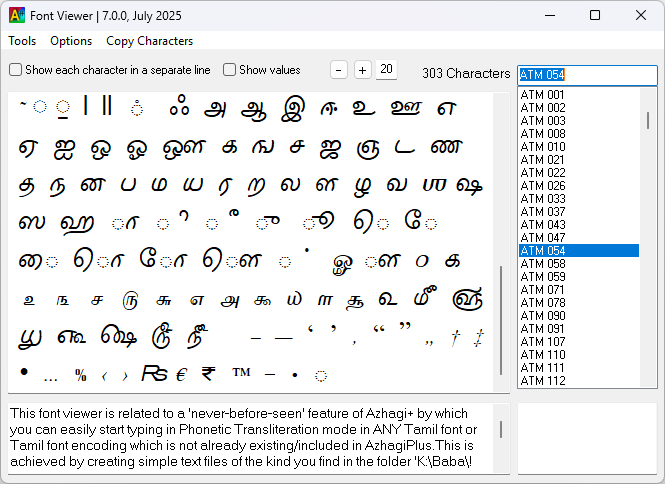
Another value-added version of Windows Character Map. With this, one can not only view the Character Map of any installed font but also by ticking "Show each character in a separate line" and "Show values", one can copy/paste the displayed info in a file. This is very useful while creating a new LFK as a txt OR xml file.
Wishing Viswanathan good health and continue to contribute.
Source for the above: The comments section of https://www.youtube.com/watch?v=VdMOAgIaycg wherein user-wellwisher Shri. Seshadri has written as above.
Azhagi++'s Font Viewer
- Azhagi++ also has the same font viewer which one sees inbuilt in Azhagi+ but this one has some extra features.
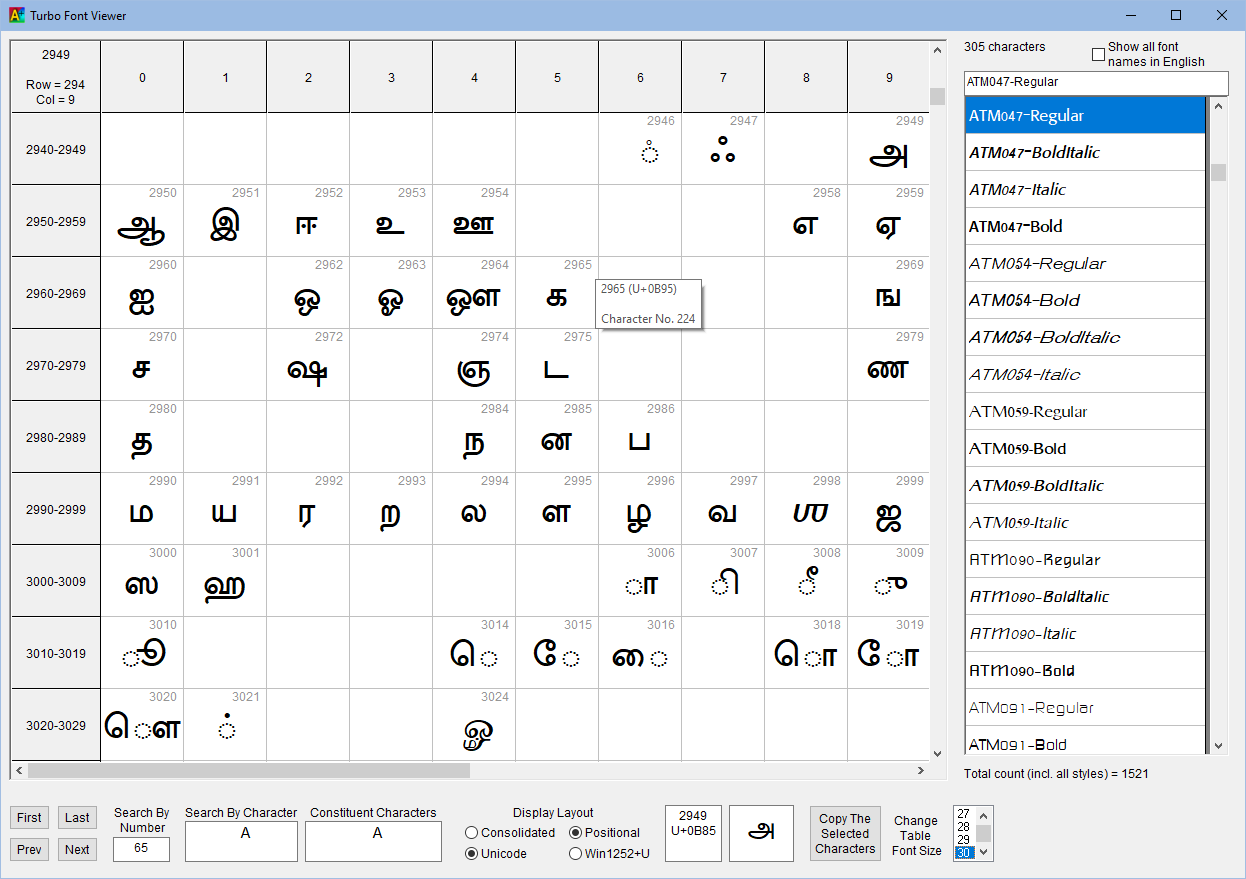
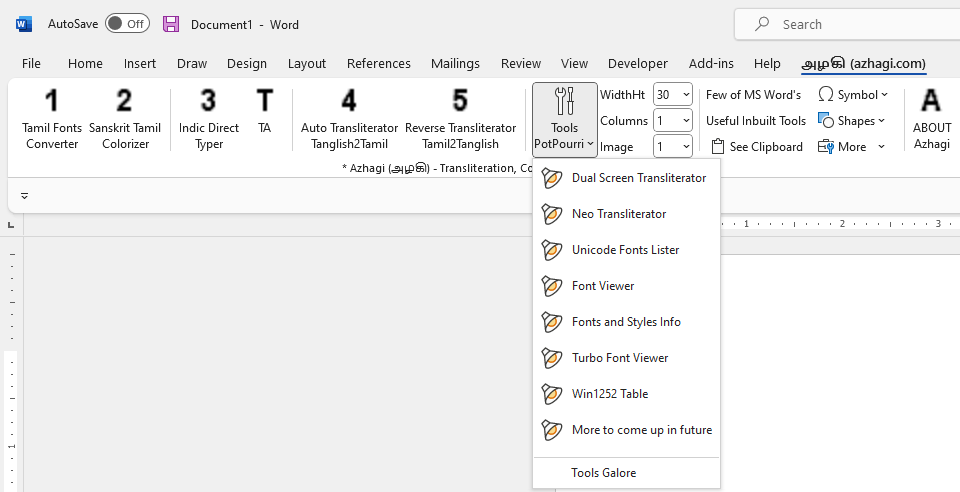
- Apart from the above font viewer, there is an additional font viewer too in Azhagi++. This is a grid-based font viewer with lots of features. It is named 'Turbo Font Viewer'. Please see screenshots below.
- The interface is the same as in Azhagi+ but I have enhanced it with respect to certain aspects (esp. with respect to 'Win1252 characters - 128 to 159'). If you compare Azhagi+'s "Font Viewer" tool with this one, you can find out the differences, esp. with respect to NonUnicode Tamil fonts.
- If you need to edit the characters, click on "Options->Allow for editing of characters" menu item
- 'Copy Characters' menu items helps you to copy the characters easily. If you select any characters, then those characters alone will get copied.
- Grid-based display.
- You can select characters (anywhere in the grid) with your mouse itself and copy/paste them to the clipboard by clicking the 'Copy characters' button.
- Characters from the full range (0 to 1114111) of Unicode are shown^.
- You can search by a unicode value "dynamically".
- You can search by a character.
- You can increase/decrease font size^^ of characters display "dynamically".
- You can show font names either in English or in that font's language.
- The cells show decimal values in the top right corner.
- The cells have tooltips which clearly show both hexa and decimal values of the characters.
- The character number is also shown in tooltips.
- You can view the characters either by position OR consolidatedly.
- You can see constituent characters when the 'search by character' string contains more than one character in it. For e.g. searching on Sri.
- You can navigate the characters using Prev, Next, First, Last.
- The row heights are changeable using mouse. (^) If code points are present above BMP (basic multilingual plane) in a particular font, few of these code points do not get displayed in certain fonts (e.g. 'UniFont Upper' font. 'Rumi' Numerals, starting from 69216)
Screenshot of the 'Font Viewer' tool
Screenshot of the 'Turbo Font Viewer' tool
Features overview of the 'Font Viewer' module
Features overview of the 'Turbo Font Viewer' module
(^^) Works in positional view only now.
Important Note: If you untick the 'Show characters from BMP alone' menu option, then, as of now (13-Jan-2023), this tool, in "few" systems (not all), may display some error messages. So, if you are not in any need to see characters above BMP (Basic Multilingual Plane), then there is no need for you to untick this option and thus you can use this tool ever without any issues. If and when I get time, I shall try to rectify this error in future. Thanks for your understanding.
AAW's Font Viewers
- It has the same two font viewers which one sees inbuilt in Azhagi++. One can download AAW (Azhagi's Addins for MS Word) from https://azhagi.com/azhagi's-addins-for-msword.php
Demo videos on the font converters explained above- There are no dedicated videos created by users to explain the font viewers present in Azhagi+, Azhagi++ and AAW. However, a portion of the following video talks about the font viewer present in Azhagi+.
https://www.youtube.com/watch?v=Z1FnP7Dp1BU&t=13m48s
Please watch the portion from 13:48 to 14:47 - If you need to edit the characters, click on "Options->Allow for editing of characters" menu item
- 'Copy Characters' menu items helps you to copy the characters easily. If you select any characters, then those characters alone will get copied.
- There are no dedicated videos created by users to explain the font viewers present in Azhagi+, Azhagi++ and AAW. However, a portion of the following video talks about the font viewer present in Azhagi+.
Azhagi - God's Own Apps - Videos
Videos on Tamil typing using Azhagi+


































Videos on SITA (SaiIndira TAmil) Self-Typing fonts
SITA fonts - Unique and first of their kind - Click here for full details
Videos on Indic typing using Azhagi+


Videos on AAW, AAE


Videos on Azhagi++




Video on Alt+3 vs Alt+4
Videos on Portable Azhagi+

