












add_task heart_plus
Help - for 'Smart Editing' and 'Copy Paste' options
Related pages: Azhagi's Addins for MS Word, My Motto, Your "non-monetary non-material" Contribution, Testimonials, Spread the News, All innovations free for all, The SELF
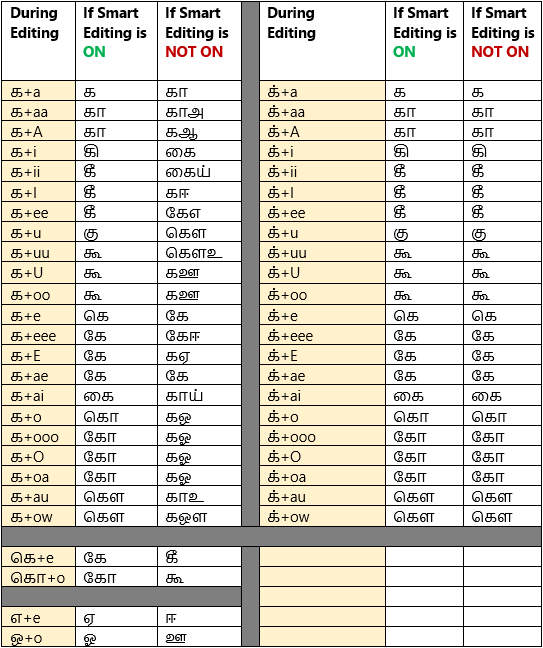
So, as you can see, 'Smart Editing' is primarily nothing but treating uyirmey agaram (க, ச, ட, etc.) as mey itself. As an user, I felt that 'Smart Editing' will be intuitive and helpful. But, if you feel it won't be helpful or it will be counterintuitive, then you can always keep the "Smart Editing ON" option unticked. As simple as that.
Typing vs Editing
In case you are not clear as to what exactly I mean by 'Editing' (when compared to 'Typing'), then read ahead.
"Typing" means keying in your Tamil letters in your normal flow, forming one Tamil word after another, separated by a space or any other punctuation. For e.g. "அம்மா, நீங்க எப்படி இருக்கீங்க? நாங்க நலம்.". During this process, 'Smart Editing' will not take effect. In other words, the treatment of uyirmey agaram (க, ச, ட, etc.) as mey will not take place.
"Editing" means
Smart Editing (Acts in MS Word only)
So, as you can see, 'Smart Editing' is primarily nothing but treating uyirmey agaram (க, ச, ட, etc.) as mey itself. As an user, I felt that 'Smart Editing' will be intuitive and helpful. But, if you feel it won't be helpful or it will be counterintuitive, then you can always keep the "Smart Editing ON" option unticked. As simple as that.
Typing vs Editing
In case you are not clear as to what exactly I mean by 'Editing' (when compared to 'Typing'), then read ahead.
"Typing" means keying in your Tamil letters in your normal flow, forming one Tamil word after another, separated by a space or any other punctuation. For e.g. "அம்மா, நீங்க எப்படி இருக்கீங்க? நாங்க நலம்.". During this process, 'Smart Editing' will not take effect. In other words, the treatment of uyirmey agaram (க, ச, ட, etc.) as mey will not take place.
"Editing" means
- Shifting or moving the caret point (using Arrow keys, Page Up/Down keys, Mouse cursor, etc.) to different areas in your document to make corrections (e.g. correct spelling mistakes) here and there. This is where keeping the 'Smart Editing ON' option ticked will prove very useful, I feel, personally.
- Shifting or moving the caret point (using Arrow keys, Page Up/Down keys, Mouse cursor, etc.) to a different area in your document and start "typing" continuously, as usual, from that point, to insert a new content. In this case, at the very beginning of starting to type out a new content, 'Smart Editing' may come in handy I believe, if in case you start typing from the end of a word, intending to correct the last letter of the word before starting to type continuously. For e.g. Suppose after typing "முதியவர்கள நாம் அன்புடன் நடத்த வேண்டும்", you notice that you need to correct the "ள" to "ளை". So, you can move the caret point to be placed after the word "முதியவர்கள" and then just type 'ai' to change ள to ளை. In other words, to change 'முதியவர்கள' to 'முதியவர்களை'.
- Correcting a word after pressing backspace key can also happen. For instance, as soon as you finish typing முதியவர்களிடம், if you feel like changing it to முதியவர்களை, then you will be naturally pressing backspace key to do the correction. You will press it 4 times so that the word is now முதியவர்கள. At the point, if 'Smart Editing' is ON, then you can easily type 'ai' to change 'ள' to 'ளை'. In other words, to change 'முதியவர்கள' to 'முதியவர்களை'.
Editing of External Copy/Pasted Texts (Specific to MS Word)
- The option "Enable correct editing for 'copy pasted' external Tamil texts also" would not have been necessary but for the manner in which MS Word (even 2007) behaved when I tried to apply the 'SuperFast Editing' feature to Tamil texts copy/pasted from external sources (Notepad, WordPad, Gmail, Facebook, Websites, etc.).
- What happened was that the vowel signs did not join with the uyirmey agarams at all and appeared disjointed. You can see for yourself what I mean if you keep this option unticked and copy/paste some Tamil text typed in Notepad to MS Word and start editing that external text at various places. For e.g. trying to change 'க்' to 'கி' by typing 'i' after 'க்'. What happened was that 'கி' got displayed as 'கி'.
- Because of this behaviour of MS Word, I had to introduce this new option and it involved additional work for me.
- In case you are not going to copy/paste any text from external sources into your MS Word documents, then my suggestion for you would be to keep this option UNTICKED. Because, the usual typing process will be faster, with this option unticked.
- Also, if your primary typing activities are only in applications other than MS Word, then also, you shall keep this option UNTICKED always.
- If you, as an user, can find out find some or other way (say, some setting in MS Word) by which the abovesaid behaviour of MS Word can be set right, kindly let me know. Then, there would not be any need for this option.
- NOTE: If the abovementioned 'கி' is copy/pasted in Notepad, WordPad, etc., they appear correctly as 'கி' itself. However, it appears as 'கி' only when copy/pasted in Gmail. That makes me feel that since MS Word internally uses XML to store all the characters of a document, it perhaps stores 'கி' as separate characters (க and ி), enclosing each of these characters in separate XML markups. The case must be similar with Gmail also, I believe.
🌷🌿🤲 ஒரு நெஞ்சார்ந்த வேண்டுகோள் 🤲🌿🌷
🌷🌿🤲 A heartfelt Appeal 🤲🌿🌷
- Please note that there is no team here. I have been developing all of Azhagi's free apps from my home, amidst many hardships (including extreme health situations at times), ever since 2000, as an offering to God.
- All the support for this SatKarma – a saga of Love - lovingly provided by my better half. Ultimately, All Glory and Thanks to the Lord Almighty alone. Forever.
- All the Azhagi free apps (16 of them as of today, and more to come, God willing) are world class in nature, with many never-before-seen features, benefiting crores across the globe. All these unique apps are available to you at absolutely no cost. Peerless and Priceless. Support for them is free too — even over phone, whatsapp, etc.!!! (Thanks to the Great gopalan sir — eternally, in tons), which is unheard-of, unprecedented and unparalleled, in the field of freeware.
- So, I kindly request you to spread the word about all the Azhagi free apps, esp. in the social media, in as many ways as possible, so that more and more of the society get benefited. One best way is to host a video on one or more of the Azhagi free apps in your YouTube channel (if you own one). I have listed 36 other ways in my spread.php page. Also, please visit contribute.php page and see in what all ways you can contribute to Azhagi — nonmonetarily, nonmaterially.
- By the way, since many years (I will be turning 59 soon), I have striven my best to not to watch TV, not to see movies, not to read newspapers, not to hear songs, etc. I go out of my home itself only rarely. I have worked ever so hard on Azhagi, working late night many a times. I have worked the whole night through too, now and then (extending to the next day too occasionally), even amidst my chronic health issues. My motto is to spend as much time as I can on Azhagi free apps and Azhagi free apps alone (in other words, in Azhagi SatKarma alone), until I am destined to.
- In fact, as mentioned here, I have been praying to God to give me boons like "no-Hunger, no-Sleep, no-Thirst, etc."... with the best of health condition and a serene mental state always, in order to carry out Azhagi SatKarma without any interruptions, whatsoever.
- So, after using any of Azhagi's free apps for a few days, kindly please share your feedback and testimonials for it (at my email address Birthless.Deathless@gmail.com). I would greatly appreciate it. Alternatively, you can share your feedback or testimonials in Azhagi's facebook group, if you prefer it that way. Even a one-liner saying "Everything is working well" would be of immense value. Thanks.
- You may also prefer to share your testimonial or heartfelt feelings on Azhagi in the comments section of the very loving write-up on Azhagi in 'Sri Sathya Sai Yugam' webzine. I will feel mighty glad.
- In my own personal humble opinion, sharing your testimonial for Azhagi is one other soulful opportunity for you to offer your immense Gratitude to the Divine. Thanks.
- For examples on how users have shared their hearty/heartfelt testimonials for Azhagi in the past, please visit the testimonials page.
-
Humbly Yours - viswanathan - author, Azhagi free apps
| Sri Sathya Sai Yugam - on Azhagi || ஸ்ரீ சத்யசாயி யுகம் - ஸ்வாமியின் அழகி குறித்து |
Spread, Host, and Contribute
- Spread the word: Once you have started to use any of the Azhagi free apps comfortably, I kindly request you to spread the word about them, esp. in the social media, in as many ways as possible, so that more and more of the society get benefited. Thanks.
- Host a video: Please host a video demo on any of the Azhagi free apps in your YouTube channel (if you own one) — this is one of the best ways in which you can help spread the word about 'Azhagi for Mac'. I have listed 36 other ways in my spread.php page.

- Contribute non-monetarily, non-materially: Please visit contribute.php page and see in what all ways you can contribute to Azhagi, non-monetarily, non-materially.
🌷🌿🤲 ஒரு நெஞ்சார்ந்த வேண்டுகோள் 🤲🌿🌷
🌷🌿🤲 A heartfelt Appeal 🤲🌿🌷
- Please note that there is no team here. I have been developing all of Azhagi's free apps from my home, amidst many hardships (including extreme health situations at times), ever since 2000, as an offering to God.
- All the support for this SatKarma – a saga of Love - lovingly provided by my better half. Ultimately, All Glory and Thanks to the Lord Almighty alone. Forever.
- All the Azhagi free apps (16 of them as of today, and more to come, God willing) are world class in nature, with many never-before-seen features, benefiting crores across the globe. All these unique apps are available to you at absolutely no cost. Peerless and Priceless. Support for them is free too — even over phone, whatsapp, etc.!!! (Thanks to the Great gopalan sir — eternally, in tons), which is unheard-of, unprecedented and unparalleled, in the field of freeware.
- So, I kindly request you to spread the word about all the Azhagi free apps, esp. in the social media, in as many ways as possible, so that more and more of the society get benefited. One best way is to host a video on one or more of the Azhagi free apps in your YouTube channel (if you own one). I have listed 36 other ways in my spread.php page. Also, please visit contribute.php page and see in what all ways you can contribute to Azhagi — nonmonetarily, nonmaterially.
- By the way, since many years (I will be turning 59 soon), I have striven my best to not to watch TV, not to see movies, not to read newspapers, not to hear songs, etc. I go out of my home itself only rarely. I have worked ever so hard on Azhagi, working late night many a times. I have worked the whole night through too, now and then (extending to the next day too occasionally), even amidst my chronic health issues. My motto is to spend as much time as I can on Azhagi free apps and Azhagi free apps alone (in other words, in Azhagi SatKarma alone), until I am destined to.
- In fact, as mentioned here, I have been praying to God to give me boons like "no-Hunger, no-Sleep, no-Thirst, etc."... with the best of health condition and a serene mental state always, in order to carry out Azhagi SatKarma without any interruptions, whatsoever.
- So, after using any of Azhagi's free apps for a few days, kindly please share your feedback and testimonials for it (at my email address Birthless.Deathless@gmail.com). I would greatly appreciate it. Alternatively, you can share your feedback or testimonials in Azhagi's facebook group, if you prefer it that way. Even a one-liner saying "Everything is working well" would be of immense value. Thanks.
- You may also prefer to share your testimonial or heartfelt feelings on Azhagi in the comments section of the very loving write-up on Azhagi in 'Sri Sathya Sai Yugam' webzine. I will feel mighty glad.
- In my own personal humble opinion, sharing your testimonial for Azhagi is one other soulful opportunity for you to offer your immense Gratitude to the Divine. Thanks.
- For examples on how users have shared their hearty/heartfelt testimonials for Azhagi in the past, please visit the testimonials page.
-
Humbly Yours - viswanathan - author, Azhagi free apps
| Sri Sathya Sai Yugam - on Azhagi || ஸ்ரீ சத்யசாயி யுகம் - ஸ்வாமியின் அழகி குறித்து |
Spread, Host, and Contribute
- Spread the word: Once you have started to use any of the Azhagi free apps comfortably, I kindly request you to spread the word about them, esp. in the social media, in as many ways as possible, so that more and more of the society get benefited. Thanks.
- Host a video: Please host a video demo on any of the Azhagi free apps in your YouTube channel (if you own one) — this is one of the best ways in which you can help spread the word about 'Azhagi for Mac'. I have listed 36 other ways in my spread.php page.
- Contribute non-monetarily, non-materially: Please visit contribute.php page and see in what all ways you can contribute to Azhagi, non-monetarily, non-materially.
Azhagi - God's Own Apps - Videos
Videos on Tamil typing using Azhagi+



































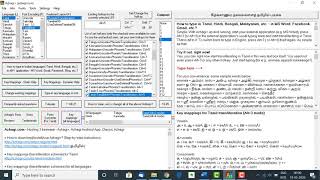

Videos on SITA (SaiIndira TAmil) Self-Typing fonts
SITA fonts - Unique and first of their kind - Click here for full details
Videos on Indic typing using Azhagi+



Videos on AAW, AAE


Videos on Azhagi++




Video on Alt+3 vs Alt+4
Videos on Portable Azhagi+

