Download 'Azhagi for Mac' - Install it in a jiffy - Start using it within a minute
(this page contains step-by-step installation instructions and detailed operational instructions as well)
Sairam..... OM Nama Shivaya! OM Namo Narayanaya!
God is Great – my humble Namaskarams to the Divinity in you, everybody and everything.
Love is God . Humility is Power — Humility is God . Love is Power
அன்பே சிவம் . பணிவே சக்தி — பணிவே சிவம் . அன்பே சக்தி
Love is Shivam . Humility is Shakthi — Humility is Shivam . Love is Shakthi
🎉 100% Free - With 100% Free Support - For All - For Life
'Azhagi for Mac' is 100% free (to all, forever), like every other app offered in azhagi.com. Support is also 100% free.
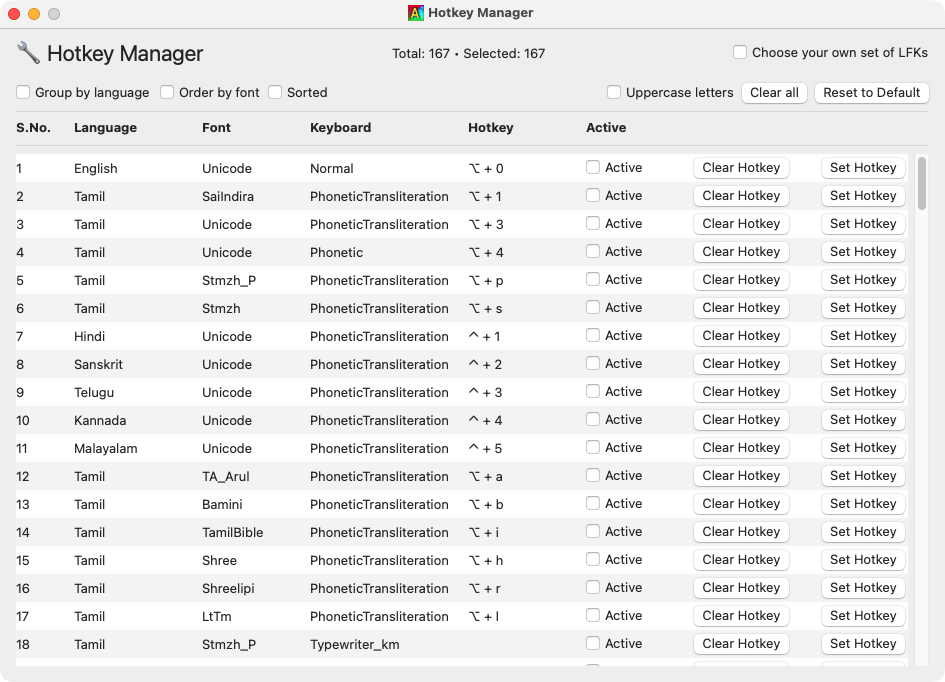
Totally, 167 LFKs (Language+Font+Keyboard combos) supported - covering Tamil, Hindi, Sanskrit, Telugu, Kannada, Malayalam, Arabic, and several other Indian/World languages.
As in the case of Azhagi for Windows, 'Azhagi for Mac' also possesses Azhagi's unique — easiest, fastest and the most flexible — Tamil transliteration scheme.
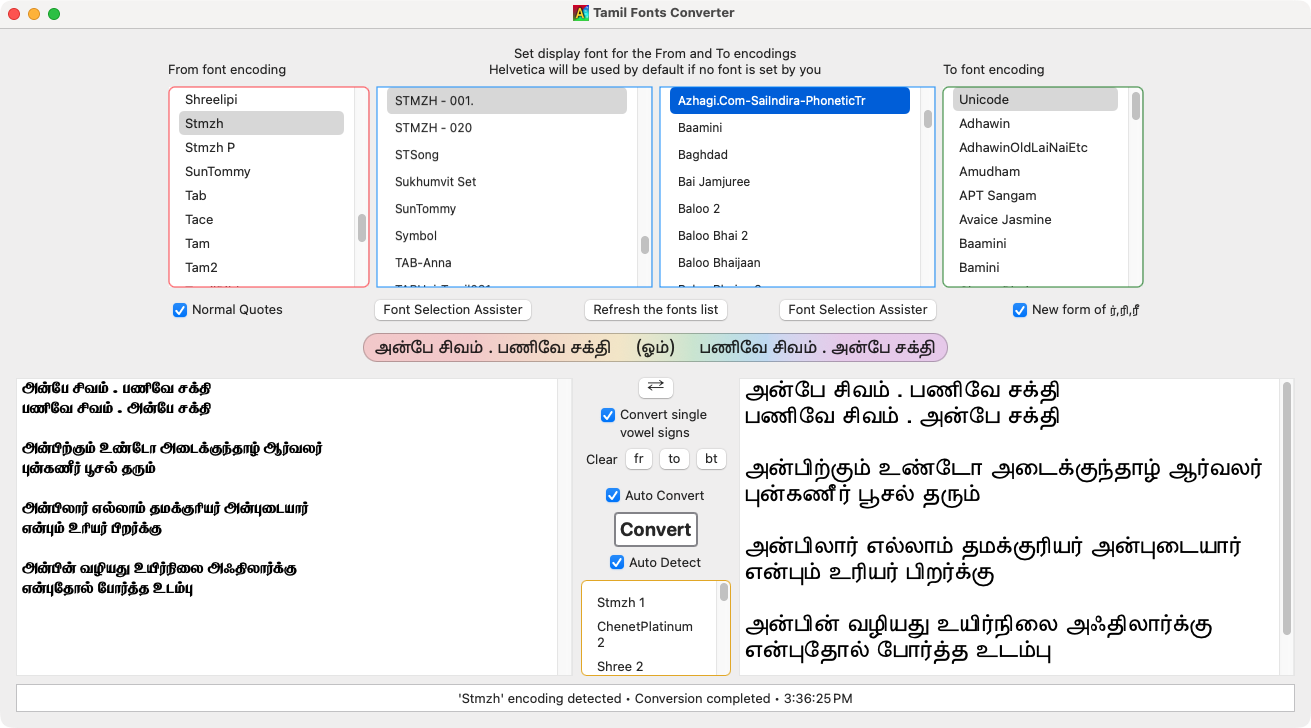
A builtin sophisticated Tamil fonts converter is also available for your use. For details, kindly visit this page.
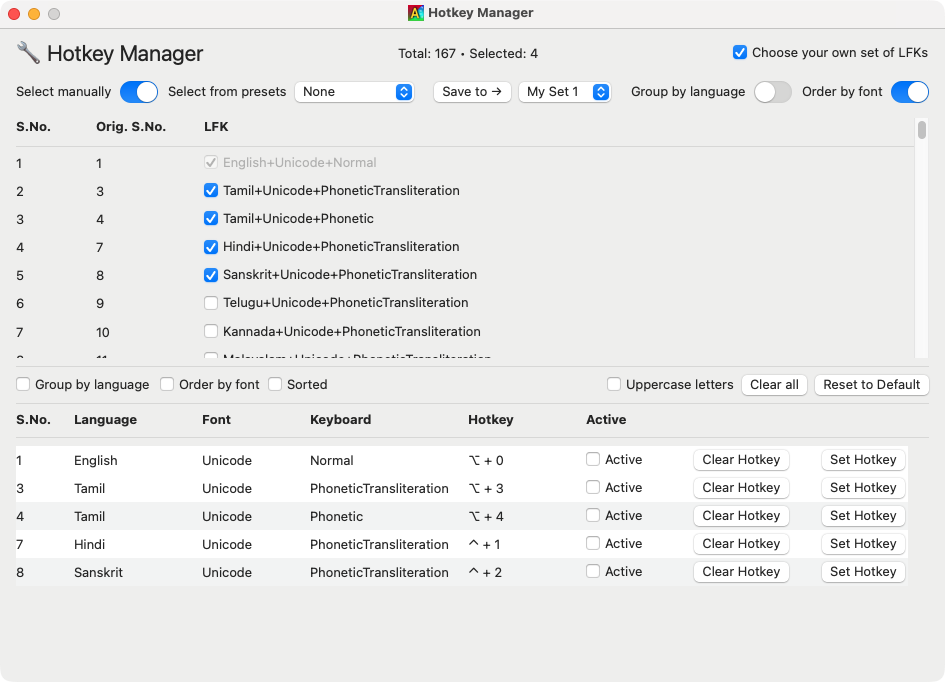
You can use the LFK Organiser to display only your desired LFKs in the Hotkey Manager screen.
Please read 'License Terms and Disclaimer info' here.
📥 Download 'Azhagi for Mac' (Latest Version)
Kindly first read my "heartfelt appeal", please — on the top right side of this same page. This is a very earnest request of mine.
Thereafter, click any of the 'Download' buttons below. The installer file "Azhagi-for-Mac-v21.pkg" will get downloaded into your system.
Thereafter, make sure to read the installation instructions below in full - to install and start using your favaorite Azhagi.
Version 21 — Released on May 21, 2026
(First Version Release — on Oct 19, 2025)
All the support for this SatKarma – a saga of Love - lovingly provided by my better half. Ultimately, All Glory and Thanks to the Lord Almighty alone. Forever.
All the Azhagi free apps (16 of them as of today, and more to come, God willing) are world class in nature, with many never-before-seenfeatures, benefiting crores across the globe. All these unique apps are available to you at absolutely no cost. Peerless and Priceless. Support for them is free too — even over phone, whatsapp, etc.!!! (Thanks to the Greatgopalan sir — eternally, in tons), which is unheard-of, unprecedented and unparalleled, in the field of freeware.
So, I kindly request you to spread the word about all the Azhagi free apps, esp. in the social media, in as many ways as possible, so that more and more of the society get benefited. One best way is to host a video on one or more of the Azhagi free apps in your YouTube channel (if you own one). I have listed 36 other ways in my spread.php page. Also, please visit contribute.php page and see in what all ways you can contribute to Azhagi — nonmonetarily, nonmaterially.
By the way, since many years (I will be turning 59 soon), I have striven my best to not to watch TV, not to see movies, not to read newspapers, not to hear songs, etc. I go out of my home itself only rarely. I have worked ever so hard on Azhagi, working late night many a times. I have worked the whole night through too, now and then (extending to the next day too occasionally), even amidst my chronic health issues. My motto is to spend as much time as I can on Azhagi free apps and Azhagi free apps alone (in other words, in Azhagi SatKarma alone), until I am destined to.
In fact, as mentioned here, I have been praying to God to give me boons like "no-Hunger, no-Sleep, no-Thirst, etc."... with the best of health condition and a serene mental state always, in order to carry out Azhagi SatKarma without any interruptions, whatsoever.
So, after using 'Azhagi for Mac' for a few days, kindly please share your feedback and testimonials for it (at my email address Birthless.Deathless@gmail.com). I would greatly appreciate it. Alternatively, you can share your feedback or testimonials in Azhagi's facebook group, if you prefer it that way. Even a one-liner saying "Everything is working well" would be of immense value. Thanks.
In my own personal humble opinion, sharing your testimonial for Azhagi is one other soulful opportunity for you to offer your immense Gratitude to the Divine. Thanks.
In case you have been already using Azhagi free apps (in Windows or Android) before starting to use 'Azhagi for Mac', then kindly share your testimonials for them too.
For examples on how users have shared their hearty/heartfelt testimonials for Azhagi in the past, please visit the testimonials page.
Sairam..... OM Nama Shivaya! OM Namo Narayanaya!
God is Great – my humble Namaskarams to the Divinity in you, everybody and everything.
Love is God . Humility is Power — Humility is God . Love is Power
அன்பே சிவம் . பணிவே சக்தி — பணிவே சிவம் . அன்பே சக்தி
Love is Shivam . Humility is Shakthi — Humility is Shivam . Love is Shakthi
🎉 100% Free - With 100% Free Support - For All - For Life
'Azhagi for Mac' is 100% free (to all, forever), like every other app offered in azhagi.com. Support is also 100% free.
Totally, 167 LFKs (Language+Font+Keyboard combos) supported - covering Tamil, Hindi, Sanskrit, Telugu, Kannada, Malayalam, Arabic, and several other Indian/World languages.
As in the case of Azhagi for Windows, 'Azhagi for Mac' also possesses Azhagi's unique — easiest, fastest and the most flexible — Tamil transliteration scheme.
A builtin sophisticated Tamil fonts converter is also available for your use. For details, kindly visit this page.
You can use the LFK Organiser to display only your desired LFKs in the Hotkey Manager screen.
Please read 'License Terms and Disclaimer info' here.
📥 Download 'Azhagi for Mac' (Latest Version)
Kindly first read my "heartfelt appeal", please — on the top right side of this same page. This is a very earnest request of mine.
Thereafter, click any of the 'Download' buttons below. The installer file "Azhagi-for-Mac-v21.pkg" will get downloaded into your system.
Thereafter, make sure to read the installation instructions below in full - to install and start using your favaorite Azhagi.
Version 21 — Released on May 21, 2026
(First Version Release — on Oct 19, 2025)
🛠 Installation Instructions
The installation steps are very simple. You can install and start using Azhagi straightaway, within a minute. No need to restart your system.
Well, once you have downloaded the .pkg installer file into the 'Downloads' folder, double-click it to launch it.
Follow the on-screen instructions to complete the installation. That is all to it.
Thereafter, click open 'Azhagi' from your 'Applications' folder.
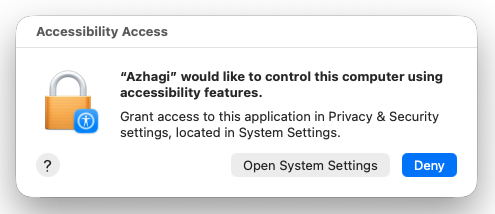
As Azhagi starts, a pop-up will appear asking you to grant 'Accessibility Access' for Azhagi. If the pop-up is hidden behind the 'Azhagi' screens, locate it and bring it to the front.
(Note: You only need to perform the following steps once. These steps are not unique to Azhagi. On macOS, any application that requires Accessibility access must go through a similar process to be granted permission. It’s a normal, standard procedure.)
Click the 'Open System Settings' button on the above pop-up.
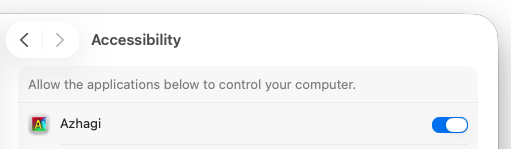
The 'Accessibility' screen will open.
Depending on your macOS version:
macOS Ventura (13) and later — including Sonoma, Sequoia and Tahoe:
Enable 'Azhagi' in the 'Accessibility' screen, by toggling it ON.
Type your system's login password if prompted.
Only in macOS Monterey (12):
Look for the Lock icon 🔒 at the bottom-left corner of that Accessibility screen.
Click it to unlock the settings.
Type your system's login password if prompted.
Enable 'Azhagi' by ticking its checbox.
Click the 'Lock' button again to secure the settings.
That is all to it.
Have a Blessed time with your favorite 'Azhagi'. 😊
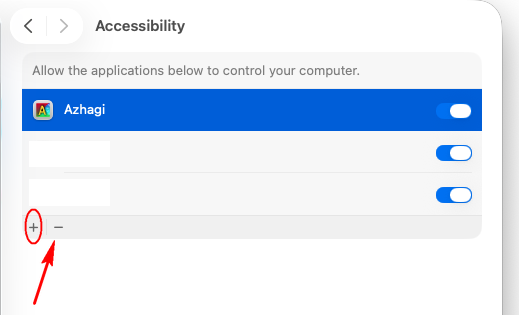
(Well, whenever you install updated versions of Azhagi in future, you "may be" again prompted for granting 'Accessibility Access' to Azhagi. At such times, as a one-time operation, I suggest you remove the existing Azhagi entry from the Accessibility screen by selecting it and clicking the ‘–’ button (at bottom left). Then, add it again by clicking the ‘+’ button and choosing Azhagi from the 'Applications' folder.)
📋 Operational Instructions
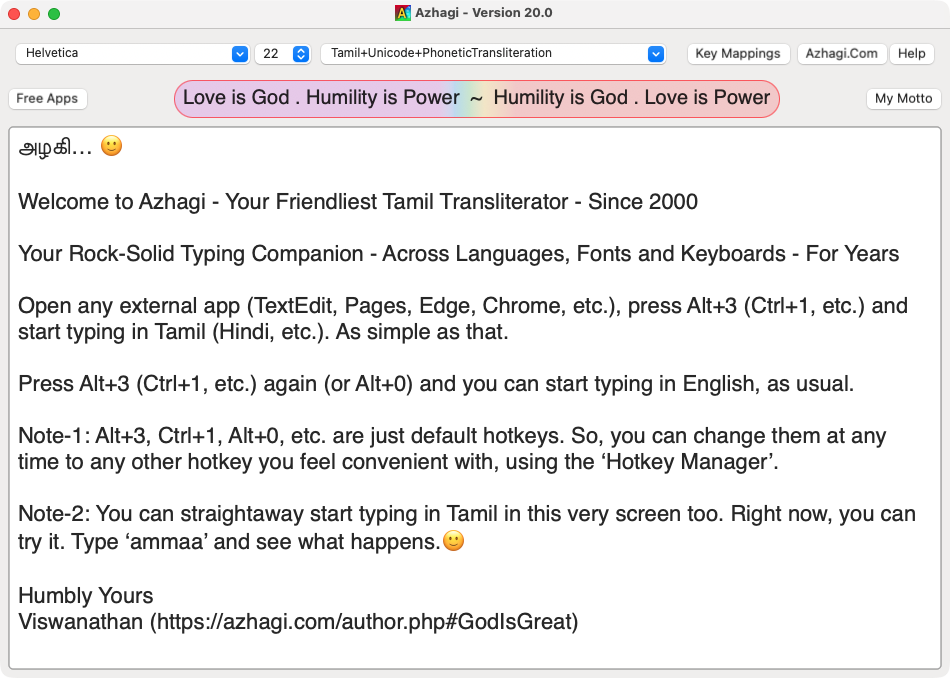
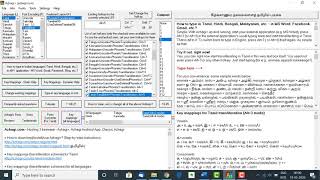
Well, how to type in Tamil (Hindi, Sanskrit, Telugu, Kannada, Malayalam, etc.) after starting 'Azhagi' successfully?
Simple. The very starting screen of 'Azhagi' itself holds the necessary instructions. Please see screenshot below.
How to type in Tamil font encodings other than Unicode?
The process is again the same. The hotkey is the only difference. For example, to type in Stmzh_P encoding, the default hotkey is Alt+P.
How to quickly and easily convert from one Tamil font encoding to another?
You can use the inbuilt 'Tamil Fonts Converter' tool (accessible from the 'Tools' menu). All details about this tool are at tamil-fonts-converter-for-mac.php
How to select, save and load "my own" preferred sets of LFKs?
Tick the checkbox with caption "Choose your own set of LFKs" (at the top right corner of the 'Hotkey Manager' screen). The LFK filter will appear. Therein, you can choose your own sets of preferred LFKs - either manually or from a list of presets - and save them to 5 of your own sets - 'My Set 1' to 'My Set 5' - and load any of them (from the presets), whenever you wish to. Please see screenshots section to learn in detail about this. There are lots of explanatory screenshots therein. Just one of those screenshots alone hereunder for you to get a quick understanding.
Languages and encodings
As of the present version, you can type directly in Tamil in any Mac app (Photoshop, Pages, TextEdit, Keynote, Numbers, InDesign, After Effects, Premiere Pro, Illustrator, etc.) - in 21 Tamil font encodings - SaiIndira, Unicode, Stmzh, Stmzh_P (specifically for typing in Photoshop), TA-Arul, Bamini, TamilBible, Shree, Shreelipi, LtTm, Ka, Vanavil, TAM, TAB, Tace, Tscii, KrutiTamil, ChenetPlatinum, SunTommy, Elango, TamilAiswarya - in 7 keyboard layouts - PhoneticTransliteration, Phonetic, Tamilnet99, TypewriterNew, TyperwriterOld, BaminiKBL and Inscript keyboard layouts.
For Unicode, Stmzh and Stmzh_P, you can type in Typewriter_km keyboard layout too. For Unicode, you can type in SanTamilPhonetics keyboard layout too.
You can type in Hindi, Sanskrit, Telugu, Kannada, Malayalam, Gujarati, Marathi, Bengali, Punjabi, Oriya, Assamese, Sourashtra, Grantha too - in any Mac app - in phonetic transliteration mode.
'Azhagi for Mac' is likely to evolve with more versions ahead.
'Azhagi for iPhone' (iPad, etc.) may also emerge in the future.
How to change hotkeys?
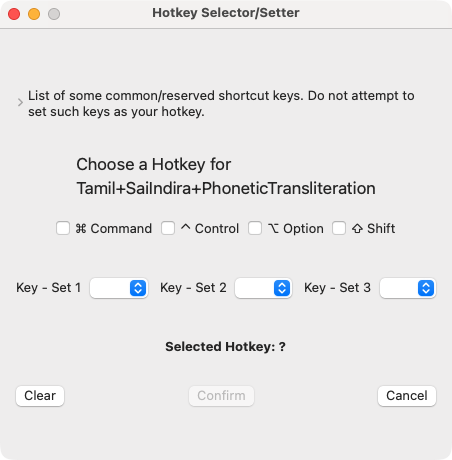
The hotkey for any LFK ('Language + Font + Keyboard' combo) can be changed, using the 'Hotkey Manager'. Please see screenshots below. Once you click 'Set Hotkey', you can select/set your desired hotkey (in the 'Hotkey Selector/Setter' screen which appears) by either ticking the appropriate boxes OR do it dynamically too by pressing your desired hotkey in your keyboard. Once you click 'Confirm', you need to close the 'Hotkey Selector/Setter' screen.
Typing without pressing any hotkey
You need not necessarily press a hotkey to start typing in Tamil in external apps. If you prefer, you can just tick/untick the 'Active' checkbox in the hotkey manager too, to activate/deactivate 'direct Tamil typing' in external apps.
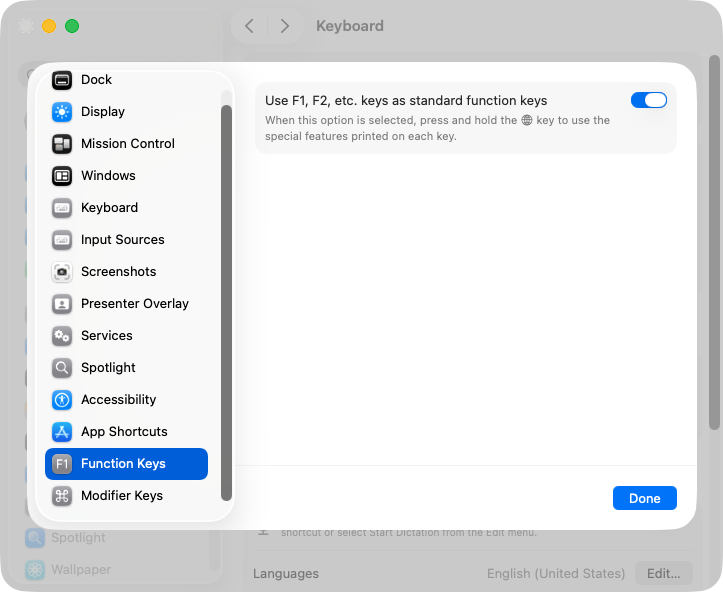
Note: If you wish to set function keys (F1, F2, etc.) as hotkeys, you may have to tick a setting in 'System Settings -> Keyboard'. Please see screenshot below. Tick the ‘Use F1, F2, etc. … .. .’ checkbox.
📝 Important Info|My Better Half
'Azhagi for Mac' is developed independently by me and offered completely free of charge to all. However, Apple requires developers to pay $99 (approx. Rs.9,000), every year, to sign and notarize apps for their seamless distribution to users. Heartfelt thanks to my loving wife for making this payment in December 2025. If not for this payment, users like you would encounter multiple warnings during the installation process such as “Azhagi cannot be opened because it is from an unidentified developer", "Apple cannot verify that this app is virus-free", etc., making the installation process less straightforward, especially for those who are not technically savvy.
And, since the aforesaid payment is a mandatory requirement set by Apple for anyone wishing to develop iOS apps, it paves the way for developing 'Azhagi for iPhone' also, God willing, in times to come. Thanks a lot to Apple for all the wonderful facilities they provide to developers via their 'Apple Developer Program' account. I may not have the resources (time, health, etc.) to avail all of those facilities but happy for whatever I am able to avail and happy for all the other developers who are able to make use of all or most of those facilities.
Please understand that your support only makes it possible for individual developers like me to keep building apps/tools that help the world society. Hence, keep providing that support by spreading the word about Azhagi free apps (which includes 'Azhagi for Mac', a signed and notarized app), whenever possible. That's all I am "primarily" requesting you. So, please spread the word.
In the case of 'Azhagi for Mac', even a small act - like sharing this link 👉 https://azhagi.com/azhagi-for-mac.php#download - can make a big difference. It would help an increasing number of people in society become aware of 'Azhagi for Mac', so that among those who become aware, the ones who need 'Azhagi for Mac' can email me, obtain the download link from me, and benefit from using Azhagi on macOS also.
Feedback from users is always invaluable. So, at your convenience, I would be grateful to hear from you on what worked greatly, what enhancements you would like to have, etc. All feedback received so far has been 100% positive only. Users who shared their experiences have reported that 'Azhagi for Mac' is functioning 100% perfectly and flawlessly, and that they feel completely comfortable using it.
🌈 Sample Testimonials
ஓம் நமசிவாய விஸ்வநாதன் ஐயா.
'மேக் அழகி' இன்ஸ்டால் செய்து விட்டேன். அதில்தான் இப்பொழுது தட்டச்சு செய்து உங்களுக்கு முதல் செய்தியை அனுப்புகிறேன். உங்களுடைய உதவிக்கும், ஒத்துழைப்புக்கும், சேவைக்கும் கோடி கோடி நன்றிகள். உங்களுடைய பணி இனிதே தொடர இறையருள் எப்பொழுதும் அருள் புரியட்டும் என்று இறைவனிடமே வேண்டிக்கொள்கிறேன்.
ஓம் நமசிவாய!
Azhagi Software Creator, I received your link, and it’s fantastic while typing in our mother tongue. May God bless you and your family for this incredible work and for making this software available to everyone for free. Thank you again.
சார், சூப்பராக வேலை செய்கிறது. நன்றி சார்...
Typing in Tamil in Stmzh fonts in Adobe products (Photoshop, After Effects, Premier Pro, Illustrator, and InDesign) is working fine.
மிக்க நன்றி சார். என்னுடைய விண்டோஸ் கணினிகளில் அழகி உதவியுடன் தமிழில் டைப் செய்தது போலவே, தற்போது மேக்புக்கிலும் அழகி துணைகொண்டு தமிழில் எழுதுவது மிகுந்த மகிழ்ச்சி அளிக்கிறது. கணினித்தமிழுக்காக இதுபோன்ற சிறந்த மென்பொருள் கருவிகளை உருவாக்கி, அவற்றை சமுதாய நலனுக்காக இலவசமாக வழங்கும் தங்கள் சிறந்த பணிகளுக்கு மீண்டும் பாராட்டுகளும் நன்றியும்.
The application is great, overall no problem, easy to understand.
ஐயா வணக்கம், நான் மதுரை மாவட்டத்தில் உள்ள சிறிய கிராமத்தில் வசித்து வருகிறேன். ... .. . நான் 6 ஆண்டுகளாக அழகி மென்பொருளை பயன்படுத்தி பத்திரங்களை பதிவு செய்து வருகிறேன். எனது வாழ்க்கை ஆதாரத்திற்கு அழகி மென்பொருள் உள்ளது. நான் தற்பொழுது ஆப்பிள் மடிக்கணினி வாங்கியுள்ளேன். அதில் அழகி மென்பொருள் இயங்குவதற்கு வெர்சன் 21 தேவைப்படுகிறது. எனவே தாங்கள் தயவுகூர்ந்து அதற்கான பதிவிறக்கம் பக்கத்தை அனுப்புமாறு மிக மிக தாழ்மையுடன் கேட்டுக்கொள்கிறேன்.
ஐயா வணக்கம், அழகி 21 version மின் அஞ்சல் மூலம் கிடைத்துவிட்டது. ... .. . மிகவும் எளிமையாகவும் நன்றாகவும் இயங்குகிறது. உங்களுக்கு நன்றி என்ற ஒரு வார்த்தை போதாது. ... .. . வாழ்க வளர்க உங்களது தொண்டு.
Dear Sri Vishwanathan, Hari Om. Salutations. Am grateful for receiving the Mac Azhagi. Have installed it and it works very well. I also see that you have some excellent free apps, which I shall explore in due course of time. My prayers for your continued good work and wishes for your good health. Do explore these links from Chinmaya International Foundation: ... .. . If you are interested in a particular Home Study Course/Svadhyaya Series Courses or a Shravana Mangalam album or a publication, do let me know. Will send it to you as a token of appreciation and gratitude.
In Shri Guru Smriti,
... .. .
All in all best, sir.
I have been using Mac Azhagi, and my experience with it has been fantastic. It is working flawlessly for me, and I am able to type in STMZH fonts using Bamini font / Typewriter New very comfortably and seamlessly. I am really very happy with it. Thank you once again for developing and providing such a wonderful and useful tool. ... .. . I am extremely happy with it. It has made typing in STMZH fonts on the Mac very convenient for me.
Thank you very much for all the effort and dedication you have put into Mac Azhagi and for your kind support.
God Bless you and your family. May God's Blessings be upon all.
Note: If you are new to Azhagi (becos you never worked in Windows systems), then testimonials for Azhagi’s windows apps are here.
For all the testimonials Azhagi free apps have received so far, As Ever, All Glory and Thanks to the Lord Almighty Only, Forever....
Azhagi apps are God's Own Apps. I am not their author, in reality. I strive to remain a non-entity.
📢 Spread the Word
Whenever possible, kindly spread the word about 'Azhagi for Mac'. Even a small act - like sharing this link 👉https://azhagi.com/azhagi-for-mac.php#download - can make a big difference. It would help an increasing number of people in society become aware of 'Azhagi for Mac', so that among those who become aware, the ones who need 'Azhagi for Mac' can email me, obtain the download link from me, and benefit from using Azhagi on macOS also.
If not aware, Azhagi.com provides 15 world-class unique freeware (https://azhagi.com/all-free-apps.php) as of today, with some of them (e.g. Azhagi++, I AM That Word) carrying a suite of beneficial/powerful tools (many of them being unique). Kindly spread their news too, whenever possible.
🙇 A Humble Request
I request you to kindly read the following short extract from the note section of my contacts page (you may read this note in full too, if and when possible)
(#) In reality though, one can never say that Azhagi free apps are due to a one-man software team, because, without my well-wishers and their timely moral support and encouragement, I (an utter non-entity) could never have prodded along alone for these many years (since 1999), amidst various health challenges. And, Azhagi free apps would never have reached worldwide. I ever remain indebted to my well-wishers. And, since 2021, ... .. .
Note: As you might be already aware, azhagi-for-mac.php is the home page of 'Azhagi for Mac'. So, for comprehensive details, news on new releases, etc., kindly always refer to the home page. Thanks.
All the support for this SatKarma – a saga of Love - lovingly provided by my better half. Ultimately, All Glory and Thanks to the Lord Almighty alone. Forever.
All the Azhagi free apps (16 of them as of today, and more to come, God willing) are world class in nature, with many never-before-seenfeatures, benefiting crores across the globe. All these unique apps are available to you at absolutely no cost. Peerless and Priceless. Support for them is free too — even over phone, whatsapp, etc.!!! (Thanks to the Greatgopalan sir — eternally, in tons), which is unheard-of, unprecedented and unparalleled, in the field of freeware.
So, I kindly request you to spread the word about all the Azhagi free apps, esp. in the social media, in as many ways as possible, so that more and more of the society get benefited. One best way is to host a video on one or more of the Azhagi free apps in your YouTube channel (if you own one). I have listed 36 other ways in my spread.php page. Also, please visit contribute.php page and see in what all ways you can contribute to Azhagi — nonmonetarily, nonmaterially.
By the way, since many years (I will be turning 59 soon), I have striven my best to not to watch TV, not to see movies, not to read newspapers, not to hear songs, etc. I go out of my home itself only rarely. I have worked ever so hard on Azhagi, working late night many a times. I have worked the whole night through too, now and then (extending to the next day too occasionally), even amidst my chronic health issues. My motto is to spend as much time as I can on Azhagi free apps and Azhagi free apps alone (in other words, in Azhagi SatKarma alone), until I am destined to.
In fact, as mentioned here, I have been praying to God to give me boons like "no-Hunger, no-Sleep, no-Thirst, etc."... with the best of health condition and a serene mental state always, in order to carry out Azhagi SatKarma without any interruptions, whatsoever.
So, after using any of Azhagi's free apps for a few days, kindly please share your feedback and testimonials for it (at my email address Birthless.Deathless@gmail.com). I would greatly appreciate it. Alternatively, you can share your feedback or testimonials in Azhagi's facebook group, if you prefer it that way. Even a one-liner saying "Everything is working well" would be of immense value. Thanks.
In my own personal humble opinion, sharing your testimonial for Azhagi is one other soulful opportunity for you to offer your immense Gratitude to the Divine. Thanks.
For examples on how users have shared their hearty/heartfelt testimonials for Azhagi in the past, please visit the testimonials page.
Spread the word: Once you have started to use any of the Azhagi free apps comfortably, I kindly request you to spread the word about them, esp. in the social media, in as many ways as possible, so that more and more of the society get benefited. Thanks.
Host a video: Please host a video demo on any of the Azhagi free apps in your YouTube channel (if you own one) — this is one of the best ways in which you can help spread the word about 'Azhagi for Mac'. I have listed 36 other ways in my spread.php page.
Contribute non-monetarily, non-materially: Please visit contribute.php page and see in what all ways you can contribute to Azhagi, non-monetarily, non-materially.
All the support for this SatKarma – a saga of Love - lovingly provided by my better half. Ultimately, All Glory and Thanks to the Lord Almighty alone. Forever.
All the Azhagi free apps (16 of them as of today, and more to come, God willing) are world class in nature, with many never-before-seenfeatures, benefiting crores across the globe. All these unique apps are available to you at absolutely no cost. Peerless and Priceless. Support for them is free too — even over phone, whatsapp, etc.!!! (Thanks to the Greatgopalan sir — eternally, in tons), which is unheard-of, unprecedented and unparalleled, in the field of freeware.
So, I kindly request you to spread the word about all the Azhagi free apps, esp. in the social media, in as many ways as possible, so that more and more of the society get benefited. One best way is to host a video on one or more of the Azhagi free apps in your YouTube channel (if you own one). I have listed 36 other ways in my spread.php page. Also, please visit contribute.php page and see in what all ways you can contribute to Azhagi — nonmonetarily, nonmaterially.
By the way, since many years (I will be turning 59 soon), I have striven my best to not to watch TV, not to see movies, not to read newspapers, not to hear songs, etc. I go out of my home itself only rarely. I have worked ever so hard on Azhagi, working late night many a times. I have worked the whole night through too, now and then (extending to the next day too occasionally), even amidst my chronic health issues. My motto is to spend as much time as I can on Azhagi free apps and Azhagi free apps alone (in other words, in Azhagi SatKarma alone), until I am destined to.
In fact, as mentioned here, I have been praying to God to give me boons like "no-Hunger, no-Sleep, no-Thirst, etc."... with the best of health condition and a serene mental state always, in order to carry out Azhagi SatKarma without any interruptions, whatsoever.
So, after using any of Azhagi's free apps for a few days, kindly please share your feedback and testimonials for it (at my email address Birthless.Deathless@gmail.com). I would greatly appreciate it. Alternatively, you can share your feedback or testimonials in Azhagi's facebook group, if you prefer it that way. Even a one-liner saying "Everything is working well" would be of immense value. Thanks.
In my own personal humble opinion, sharing your testimonial for Azhagi is one other soulful opportunity for you to offer your immense Gratitude to the Divine. Thanks.
For examples on how users have shared their hearty/heartfelt testimonials for Azhagi in the past, please visit the testimonials page.
Spread the word: Once you have started to use any of the Azhagi free apps comfortably, I kindly request you to spread the word about them, esp. in the social media, in as many ways as possible, so that more and more of the society get benefited. Thanks.
Host a video: Please host a video demo on any of the Azhagi free apps in your YouTube channel (if you own one) — this is one of the best ways in which you can help spread the word about 'Azhagi for Mac'. I have listed 36 other ways in my spread.php page.
Contribute non-monetarily, non-materially: Please visit contribute.php page and see in what all ways you can contribute to Azhagi, non-monetarily, non-materially.



 ஸ்வாமியின் அழகி குறித்து
Menu menu
ஸ்வாமியின் அழகி குறித்து
Menu menu