laptop_windows

A "beta" language setting in Windows 10 and Windows 11 - Untick it necessarily

Related page:
https://social.msdn.microsoft.com/Forums/azure/en-US/6f9f1695-9d64-43f3-8527-6b895599233a/use-unicode-utf8-for-worldwide-language-support?forum=windowsgeneraldevelopmentissues

Overview
Recently (starting March 2020 or so), a handful of Azhagi+ users started reporting the display of an "informational" error message by Azhagi+, as soon as the latest Azhagi+ 10.45 is started. Typically, the "informational" error message would say "Subscript out of range".

Only in the 1st week of June 2020, I could get time to focus on the above issue. I had to spend a whole night (and more time later on) to get to the bottom of this issue and find the root cause. For a sincere developer like me, it was a real sapping/ablation of my energy/time. One reason for not being able to attend to this issue promptly is because of the fact that I just could not reproduce the aforesaid error message in Azhagi+ in my Windows 10 system at all. Ultimately, Thanks a TON to the Lord Almighty, for without His Gracious Compassion, I could not have got to the very bottom of this tricky issue (with a beta setting that is buried very deep in the 'Windows 10' Settings Scheme) and found out the solution.

The final finding
Perfect it is, Azhagi+ 10.45, as ever. The issue reported by a handful of users is actually due to a "Windows10 and Windows11" BUG (bug, in my personal humble opinion) in a particular Windows 10/11 setting. How this buggy (in my personal humble opinion) setting is causing havoc to so many robust apps is stated/discussed in more than one web page in the net. One such web page is - https://social.msdn.microsoft.com/Forums/azure/en-US/6f9f1695-9d64-43f3-8527-6b895599233a/use-unicode-utf8-for-worldwide-language-support?forum=windowsgeneraldevelopmentissues

The bottom line
There is NO problem with Azhagi+ 10.45. The issue reported by a handful of users is to do with a buggy setting in Windows 10 and Windows 11. Once that buggy setting is set right, users can happily work with Azhagi+ 10.45 as usual.

How to set right the abovementioned buggy BETA setting in Windows 10?
IMPORTANT NOTE: Please effect the following only if you are comfortable doing the same and not otherwise. If you are not computer-savvy and hence not feeling comfortable effecting the following, then you can always take my help OR the help of any other computer-savvy person's. For Windows 11, see the screenshot at the end of this page.
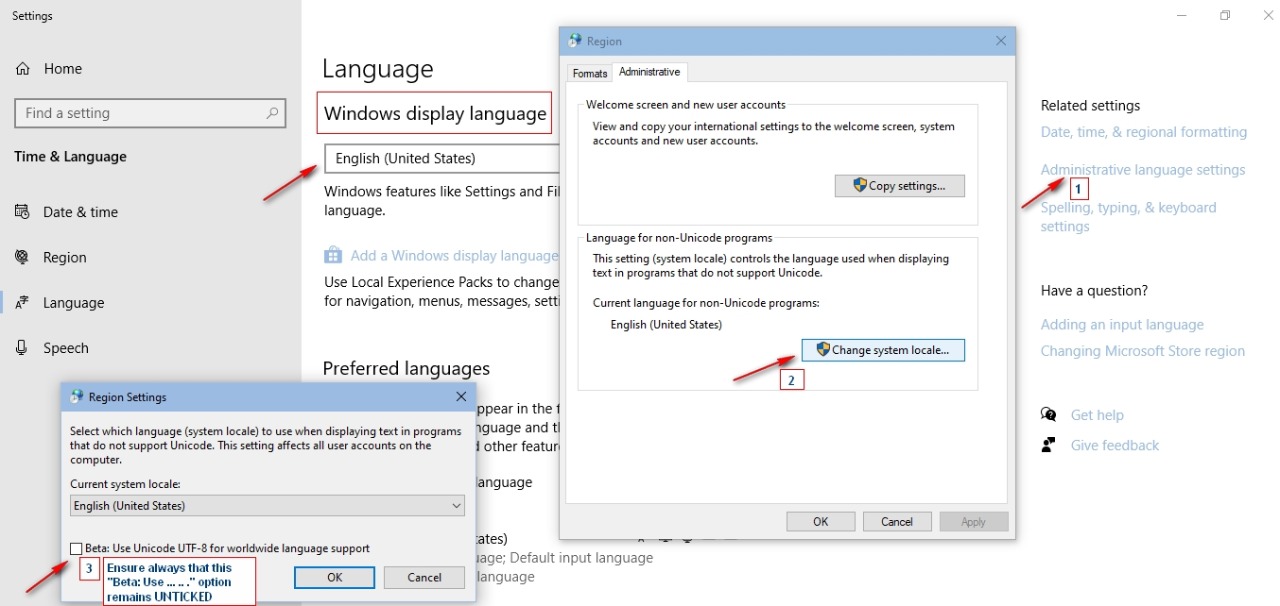
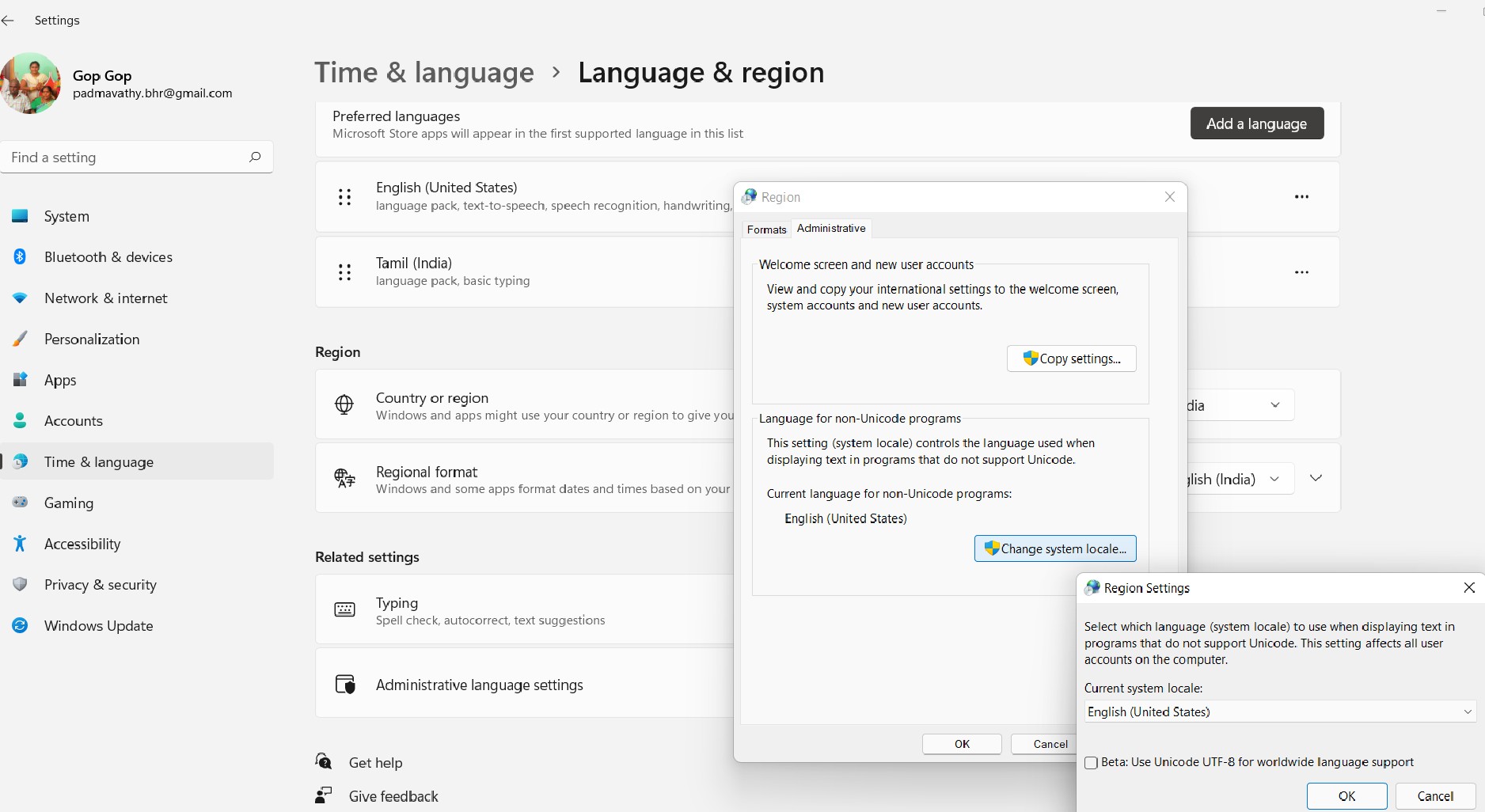
  1. Better to have a look at the screenshot below first and then read the following steps.
  2. You first need to reach 'Language Settings' screen in your Windows 10 system. One way to reach it is by typing 'language' in the 'Search Bar' at the bottom left of your taskbar and then clicking 'Language Settings' shown at the top of the list of best matches.
  3. In the 'Language Settings' screen, click on 'Administrative Language Settings' link (under 'Related Settings' on the right side top.
  4. Thereafter, click on 'Change system locale...' button.
  5. In the small window which opens, you can see a setting with caption "Beta: Use Unicode UTF-8 for worldwide language support". This setting needs to be kept UNTICKED. Then, latest 10.45 Azhagi+ will work perfectly as ever.
  • Note-1: If in case the aforesaid option is grayed out (in ticked state) and you are unable to untick it, then you need to ensure first that your display language is English and not 'Tamil', Hindi', etc. Ideally, I would suggest you to have your display language as "English (United States) US"

  • Note-2: If you try to change the display language, your system may require you to restart the system. Restarting your system may take a while. So, if you are in the midst of an urgent work, then you can schedule the task of changing the display language to a suitable later time.

  • Note-3: Once you UNTICK the aforesaid "Beta:... .. ." option, your system may require you to restart the system. So, better to save and close all your running applications and then UNTICK the aforesaid option.

  • Note-4: Restarting your system may take a while. So, if you are in the midst of an urgent work, then you can schedule your aforesaid UNTICKING task to a suitable later time.

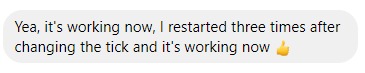
  • Note-5: VERY IMPORTANT - In some systems, restarting once may not work. You may need to restart twice or even thrice, for the UNTICKING of the "Beta..." setting to take effect fully. Or, perhaps you can completely shut down your system and then start it again, if you find Azhagi+ 10.45 still displaying an 'informational' error message, after the first restart. In this regard, please see the following supporting feedback from one user hereunder:
Screenshot - showing how to set right the abovementioned buggy BETA setting in Windows 10


Screenshot - showing how to set right the abovementioned buggy BETA setting in Windows 11


🌷🌿🤲 ஒரு நெஞ்சார்ந்த வேண்டுகோள் 🤲🌿🌷
🌷🌿🤲 A heartfelt Appeal 🤲🌿🌷
  • Please note that there is no team here. I have been developing all of Azhagi's free apps from my home, amidst many hardships (including extreme health situations at times), ever since 2000, as an offering to God.

  • All the support for this SatKarma – a saga of Love - lovingly provided by my better half. Ultimately, All Glory and Thanks to the Lord Almighty alone. Forever.

  • All the Azhagi free apps (16 of them as of today, and more to come, God willing) are world class in nature, with many never-before-seen features, benefiting crores across the globe. All these unique apps are available to you at absolutely no cost. Peerless and Priceless. Support for them is free too — even over phone, whatsapp, etc.!!! (Thanks to the Great gopalan sir — eternally, in tons), which is unheard-of, unprecedented and unparalleled, in the field of freeware.

  • So, I kindly request you to spread the word about all the Azhagi free apps, esp. in the social media, in as many ways as possible, so that more and more of the society get benefited. One best way is to host a video on one or more of the Azhagi free apps in your YouTube channel (if you own one). I have listed 36 other ways in my spread.php page. Also, please visit contribute.php page and see in what all ways you can contribute to Azhagi — nonmonetarily, nonmaterially.

  • By the way, since many years (I will be turning 59 soon), I have striven my best to not to watch TV, not to see movies, not to read newspapers, not to hear songs, etc. I go out of my home itself only rarely. I have worked ever so hard on Azhagi, working late night many a times. I have worked the whole night through too, now and then (extending to the next day too occasionally), even amidst my chronic health issues. My motto is to spend as much time as I can on Azhagi free apps and Azhagi free apps alone (in other words, in Azhagi SatKarma alone), until I am destined to.

  • In fact, as mentioned here, I have been praying to God to give me boons like "no-Hunger, no-Sleep, no-Thirst, etc."... with the best of health condition and a serene mental state always, in order to carry out Azhagi SatKarma without any interruptions, whatsoever.

  • So, after using any of Azhagi's free apps for a few days, kindly please share your feedback and testimonials for it (at my email address Birthless.Deathless@gmail.com). I would greatly appreciate it. Alternatively, you can share your feedback or testimonials in Azhagi's facebook group, if you prefer it that way. Even a one-liner saying "Everything is working well" would be of immense value. Thanks.

  • You may also prefer to share your testimonial or heartfelt feelings on Azhagi in the comments section of the very loving write-up on Azhagi in 'Sri Sathya Sai Yugam' webzine. I will feel mighty glad.

  • In my own personal humble opinion, sharing your testimonial for Azhagi is one other soulful opportunity for you to offer your immense Gratitude to the Divine. Thanks.

  • For examples on how users have shared their hearty/heartfelt testimonials for Azhagi in the past, please visit the testimonials page.
Spread, Host, and Contribute
  • Spread the word: Once you have started to use any of the Azhagi free apps comfortably, I kindly request you to spread the word about them, esp. in the social media, in as many ways as possible, so that more and more of the society get benefited. Thanks.
  • Host a video: Please host a video demo on any of the Azhagi free apps in your YouTube channel (if you own one) — this is one of the best ways in which you can help spread the word about 'Azhagi for Mac'. I have listed 36 other ways in my spread.php page.
  • Contribute non-monetarily, non-materially: Please visit contribute.php page and see in what all ways you can contribute to Azhagi, non-monetarily, non-materially.
🌷🌿🤲 ஒரு நெஞ்சார்ந்த வேண்டுகோள் 🤲🌿🌷
🌷🌿🤲 A heartfelt Appeal 🤲🌿🌷
  • Please note that there is no team here. I have been developing all of Azhagi's free apps from my home, amidst many hardships (including extreme health situations at times), ever since 2000, as an offering to God.

  • All the support for this SatKarma – a saga of Love - lovingly provided by my better half. Ultimately, All Glory and Thanks to the Lord Almighty alone. Forever.

  • All the Azhagi free apps (16 of them as of today, and more to come, God willing) are world class in nature, with many never-before-seen features, benefiting crores across the globe. All these unique apps are available to you at absolutely no cost. Peerless and Priceless. Support for them is free too — even over phone, whatsapp, etc.!!! (Thanks to the Great gopalan sir — eternally, in tons), which is unheard-of, unprecedented and unparalleled, in the field of freeware.

  • So, I kindly request you to spread the word about all the Azhagi free apps, esp. in the social media, in as many ways as possible, so that more and more of the society get benefited. One best way is to host a video on one or more of the Azhagi free apps in your YouTube channel (if you own one). I have listed 36 other ways in my spread.php page. Also, please visit contribute.php page and see in what all ways you can contribute to Azhagi — nonmonetarily, nonmaterially.

  • By the way, since many years (I will be turning 59 soon), I have striven my best to not to watch TV, not to see movies, not to read newspapers, not to hear songs, etc. I go out of my home itself only rarely. I have worked ever so hard on Azhagi, working late night many a times. I have worked the whole night through too, now and then (extending to the next day too occasionally), even amidst my chronic health issues. My motto is to spend as much time as I can on Azhagi free apps and Azhagi free apps alone (in other words, in Azhagi SatKarma alone), until I am destined to.

  • In fact, as mentioned here, I have been praying to God to give me boons like "no-Hunger, no-Sleep, no-Thirst, etc."... with the best of health condition and a serene mental state always, in order to carry out Azhagi SatKarma without any interruptions, whatsoever.

  • So, after using any of Azhagi's free apps for a few days, kindly please share your feedback and testimonials for it (at my email address Birthless.Deathless@gmail.com). I would greatly appreciate it. Alternatively, you can share your feedback or testimonials in Azhagi's facebook group, if you prefer it that way. Even a one-liner saying "Everything is working well" would be of immense value. Thanks.

  • You may also prefer to share your testimonial or heartfelt feelings on Azhagi in the comments section of the very loving write-up on Azhagi in 'Sri Sathya Sai Yugam' webzine. I will feel mighty glad.

  • In my own personal humble opinion, sharing your testimonial for Azhagi is one other soulful opportunity for you to offer your immense Gratitude to the Divine. Thanks.

  • For examples on how users have shared their hearty/heartfelt testimonials for Azhagi in the past, please visit the testimonials page.
Spread, Host, and Contribute
  • Spread the word: Once you have started to use any of the Azhagi free apps comfortably, I kindly request you to spread the word about them, esp. in the social media, in as many ways as possible, so that more and more of the society get benefited. Thanks.
  • Host a video: Please host a video demo on any of the Azhagi free apps in your YouTube channel (if you own one) — this is one of the best ways in which you can help spread the word about 'Azhagi for Mac'. I have listed 36 other ways in my spread.php page.
  • Contribute non-monetarily, non-materially: Please visit contribute.php page and see in what all ways you can contribute to Azhagi, non-monetarily, non-materially.

Beloved Baba says 👉       All work is God’s; He inspires, He helps, He executes, He enjoys, and He is pleased.        👈 Beloved Baba says
Videos on Tamil typing using Azhagi+
Not able to fetch video thumbnail Not able to fetch video thumbnail Not able to fetch video thumbnail Not able to fetch video thumbnail Not able to fetch video thumbnail Not able to fetch video thumbnail Not able to fetch video thumbnail Not able to fetch video thumbnail Not able to fetch video thumbnail Not able to fetch video thumbnail Not able to fetch video thumbnail Not able to fetch video thumbnail Not able to fetch video thumbnail Not able to fetch video thumbnail Not able to fetch video thumbnail Not able to fetch video thumbnail Not able to fetch video thumbnail Not able to fetch video thumbnail Not able to fetch video thumbnail Not able to fetch video thumbnail Not able to fetch video thumbnail Not able to fetch video thumbnail Not able to fetch video thumbnail Not able to fetch video thumbnail Not able to fetch video thumbnail Not able to fetch video thumbnail Not able to fetch video thumbnail Not able to fetch video thumbnail Not able to fetch video thumbnail Not able to fetch video thumbnail Not able to fetch video thumbnail Not able to fetch video thumbnail Not able to fetch video thumbnail Not able to fetch video thumbnail Not able to fetch video thumbnail Not able to fetch video thumbnail Not able to fetch video thumbnail Not able to fetch video thumbnail Not able to fetch video thumbnail Not able to fetch video thumbnail Not able to fetch video thumbnail Not able to fetch video thumbnail Not able to fetch video thumbnail Not able to fetch video thumbnail Not able to fetch video thumbnail Not able to fetch video thumbnail Not able to fetch video thumbnail Not able to fetch video thumbnail Not able to fetch video thumbnail Not able to fetch video thumbnail Not able to fetch video thumbnail Not able to fetch video thumbnail Not able to fetch video thumbnail Not able to fetch video thumbnail Not able to fetch video thumbnail Not able to fetch video thumbnail Not able to fetch video thumbnail Not able to fetch video thumbnail Not able to fetch video thumbnail Not able to fetch video thumbnail Not able to fetch video thumbnail Not able to fetch video thumbnail Not able to fetch video thumbnail Not able to fetch video thumbnail Not able to fetch video thumbnail Not able to fetch video thumbnail Not able to fetch video thumbnail Not able to fetch video thumbnail Not able to fetch video thumbnail Not able to fetch video thumbnail Not able to fetch video thumbnail Not able to fetch video thumbnail Not able to fetch video thumbnail Not able to fetch video thumbnail Not able to fetch video thumbnail Not able to fetch video thumbnail Not able to fetch video thumbnail Not able to fetch video thumbnail Not able to fetch video thumbnail Not able to fetch video thumbnail Not able to fetch video thumbnail Not able to fetch video thumbnail Not able to fetch video thumbnail Not able to fetch video thumbnail Not able to fetch video thumbnail Not able to fetch video thumbnail Not able to fetch video thumbnail Not able to fetch video thumbnail Not able to fetch video thumbnail Not able to fetch video thumbnail Not able to fetch video thumbnail Not able to fetch video thumbnail Not able to fetch video thumbnail Not able to fetch video thumbnail Not able to fetch video thumbnail Not able to fetch video thumbnail Not able to fetch video thumbnail Not able to fetch video thumbnail Not able to fetch video thumbnail Not able to fetch video thumbnail Not able to fetch video thumbnail Not able to fetch video thumbnail Not able to fetch video thumbnail Not able to fetch video thumbnail Not able to fetch video thumbnail Not able to fetch video thumbnail Not able to fetch video thumbnail Not able to fetch video thumbnail Not able to fetch video thumbnail Not able to fetch video thumbnail Not able to fetch video thumbnail
Videos on SITA (SaiIndira TAmil) Self-Typing fonts
SITA fonts - Unique and first of their kind - Click here for full details
Not able to fetch video thumbnail Not able to fetch video thumbnail
Videos on Indic typing using Azhagi+
Not able to fetch video thumbnail Not able to fetch video thumbnail Not able to fetch video thumbnail Not able to fetch video thumbnail Not able to fetch video thumbnail Not able to fetch video thumbnail Not able to fetch video thumbnail
Videos on AAW, AAE
Not able to fetch video thumbnail Not able to fetch video thumbnail Not able to fetch video thumbnail
Videos on Azhagi++
Not able to fetch video thumbnail Not able to fetch video thumbnail Not able to fetch video thumbnail Not able to fetch video thumbnail Not able to fetch video thumbnail
Video on Alt+3 vs Alt+4
Not able to fetch video thumbnail
Alt+3
na=ந, ee=ஈ, oo=ஊ
VS
wa=ந, ee=ஏ, oo=ஓ
Alt+4
Videos on Portable Azhagi+
Not able to fetch video thumbnail Not able to fetch video thumbnail Not able to fetch video thumbnail Not able to fetch video thumbnail