Azhagi Facebook Group

font_download
100s of Free Fonts


-
 Print and Web fonts - Beautiful Sai fonts - for Documents printing, Book publishing, Websites, etc.SaiIndira.ttf (SaiIndira) | Sai-Sai.ttf (Sai-Sai) | SaiEmbed-forPDF.ttf (SaiEmbed-forPDF) | SaiVrishin.ttf (SaiVrishin) | Download SaiFonts_Installer.exe to install the aforementioned 4 fonts of Tscii encoding along with 2 more Tscii fonts - SaiJothi & SaiMalar | TSCu_SaiIndira.ttf (TSCu_SaiIndira) - Unicode (cum Tscii) encoding | SaiMeera.ttf (SaiMeera) - TAB encoding
நீங்கள் கீழ்க்காணும் மிக அழகிய (கண்ணில் ஒற்றிக் கொள்ள வேண்டும் போல் உள்ள) தமிழ் எழுத்துக்கள், அழகி செயலியின் பிரத்தியேக எழுத்துருவான 'சாய் இந்திரா' எழுத்துருவில் அமையப் பெற்றவையே. "தமிழ் என்றால் முருகர், முருகர் என்றால் அழகு, அழகு என்றால் முருகர்" என்று யாவரும் என்றும் சொல்லும் வண்ணம் விளங்கும் நம் முருகப் பெருமானின் புகழைப் பாடவே மட்டும் என்று பிரத்தியேகமாக உள்ள kaumaram.com^^ வலைத்தளத்தில், contents பக்கத்தில் உள்ள ஒரு பகுதியே நீங்கள் கீழே காண்பது.
இதுபோல், 'சாய் இந்திரா' எழுத்துரு பல்வேறு வகைகளில் பயன்படுத்தப்படுகிறது - எம்.எஸ் வேர்ட் (MS Word) ஆவணங்கள் தயார் செய்ய, தரமான எழுத்து வடிவில் புத்தங்கள் வெளியீடு செய்ய (Book Publishing), ஃபோட்டோஷாப் 7 (PhotoShop 7) / ஃபில்மோரா (Filmora) / பவர் டைரக்டர் (Power Director) / டாவின்சி ரிசால்வ் (Davinci Resolve. ஈடியஸ் ப்ரோ ((EDIUS Pro) போன்ற Designer அப்ளிகேஷன்களில் எளிதாய் தமிழில் உங்கள் படைப்புகளை மிளிரச் செய்ய, என்று - முற்றிலும் இலவசமாக.
குறிப்பு: SaiIndira என்பதில் Indira என் அன்பு அன்னையின் பெயர். Sai எதைக் குறிக்கின்றது என்று பலருக்கும் தெரிந்திருந்தாலும், பொதுவாக அது உணர்த்துவது Universal Love என்ற பரந்த எண்ணத்தையே ஆகும்.

(^^) kaumaram.com is perhaps the world's largest website for Lord Sri Murugar, catering to devotees' needs ever since 2001. And, the Tamil contents in the site are existing solely in Azhagi's SaiIndira font, ever since 2005 or so. It is Divinely worth mentioning here that "God's Own App" Azhagi's inception was in the year 2000.
-
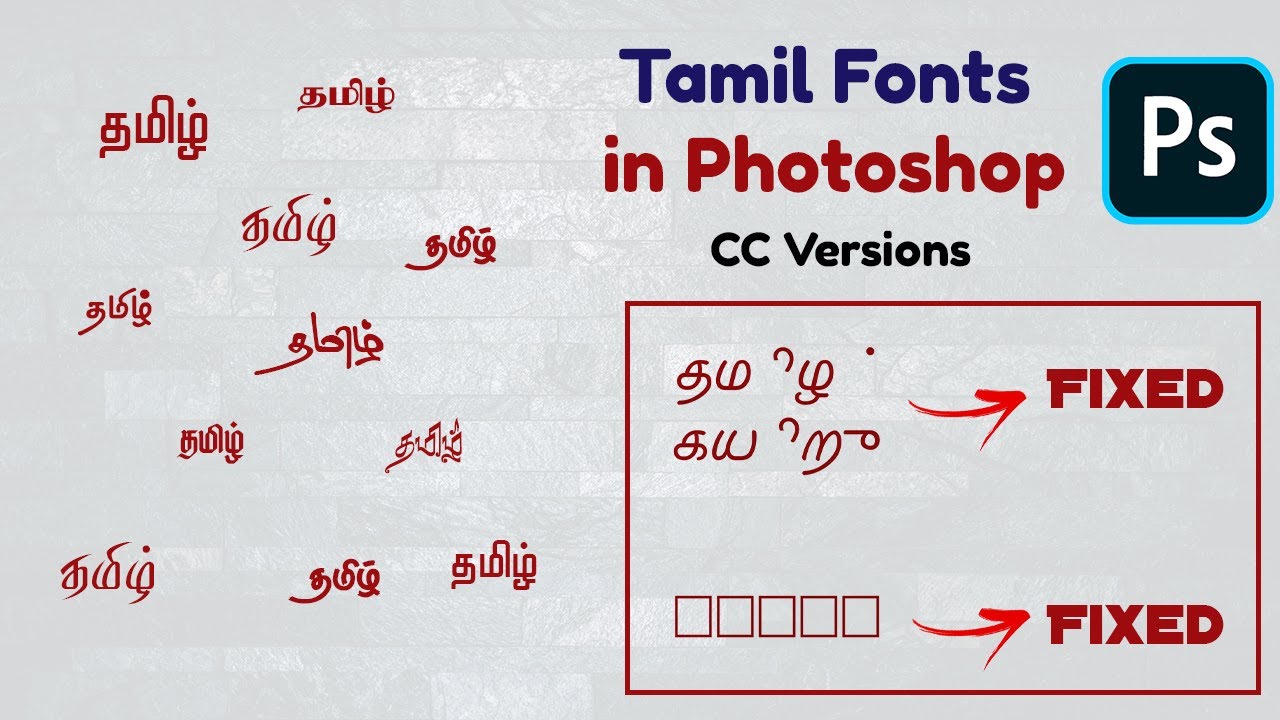
Stylish Design fonts - 100s of them - STMZH, RGB, SR, etc. - for Photoshop, Illustrator, etc.Download STMZH, RGB, SR - Stylish Design FontsIf your need is to type in "very many different styles"-bearing, very elegant, very beautiful and very stylish designing Tamil fonts like STMZH or RGB or SR Tamil fonts (300+ of them) in Photoshop, InDesign, Illustrator, Premiere Pro, After Effects, CorelDraw, Filmora, etc., then please see the following videos for sure (created by Azhagi users, not by me):
By watching one or more of the videos below, you will:- Learn how to easily type in STMZH or SR or RGB fonts in Photoshop, Adobe Premiere Pro, etc.
- Download the abovementioned STMZH or SR or RGB fonts by following the links mentioned in the video OR in the video description.
- For instance, in the very first video itself (https://youtube.com/watch?v=6L7RVkZEJw4), in the 'Description' section below the video, you can find the link captioned "Tamil Font Download Link" which will help you to easily download all of the above stylish design fonts (around 300 of them).
- If you want to download STMZH fonts alone, then you can visit this page - https://tamilfontconverter.blogspot.com/p/tamil-font_25.html and click on the blue Download button corresponding to "STMZH - 256".
- If you want to download RGB fonts alone, then you can visit this page - https://tamilfontconverter.blogspot.com/p/tamil-font_25.html and click on the blue Download button corresponding to "RGB Tamil - 315".
I suggest you view many more videos of the above kind (200+ of them) by visiting the following links, FOR SURE, so that you can utilise very many beautiful Tamil fonts and create very many great and wonderful graphics stuff, to your heart's content, deriving utmost satisfaction and happiness.
- https://azhagi.com/pagemaker-photoshop.php
- https://azhagi.com/videos.php
- https://azhagi.com/demos.php
- https://azhagi.com/demos2.php
- https://azhagi.com/demos3.php
DOWNLOAD 140+ Beautiful Stylish Designing Fonts - "Chenet Platinum" - for Photoshop/CorelDraw/Illustrator/Video Editors/Etc.Visit this page - https://tamilfontconverter.blogspot.com/p/tamil-font_25.html and click on the blue Download button corresponding to "CHENNET PLATINUM - 140". -
Book Publishing fonts - Download 100s of them
-
'Self-Typing' fonts - Unique and Innovative - Type phonetically (or in TamilNet99, etc. modes) using the font itself!DOWNLOAD all of azhagi.com's "Path-breaking" Unique SaiIndira "Self-typing" Unicode Tamil fonts
- Azhagi.Com-SaiIndira-Bilingual-PhoneticTransliteration.ttf (Dt. 02-May-2024 - Details are here). Its key mappings are here.
Important Note: Using the above one single font, you can type in 5 different keyboard layouts - Phonetic Transliteration, Phonetic, TamilNet99, TamilTypeWriter New, TamilTypewriter Old.
- Azhagi.Com-SaiIndira-Phonetic-BiLingual.ttf (Dt. 15-Apr-2024 - Details are here). Its key mappings are here.
- Azhagi.Com-SaiIndira-Phonetic-WordsAndPhrases.ttf (Dt. 13-Apr-2024 - Details are here)
- Azhagi.Com-SaiIndira-Phonetic-WordsAndPhrases-Colors.ttf (Dt. 13-Apr-2024 - Details are here)
- Azhagi.Com-SaiIndira-Phonetic-Bilingual-Phrases-nStart-nH.ttf (Dt. 24-Apr-2024 Details are here)
- Azhagi.Com-SaiIndira-Phonetic-Bilingual-Phrases-nStart-nH-nh.ttf (Dt. 25-Apr-2024 Details are here)
- Azhagi.Com-SaiIndira-TNet99.ttf. (Dt. 03-Apr-2024 - Based on 'TamilNet99' typing mode mappings here. )
- Azhagi.Com-SaiIndira-TwNew.ttf (Dt. 26-Apr-2024 - Based on 'Tamil Typewriter New' typing mode mappings here)
- Azhagi.Com-SaiIndira-TwOld.ttf (Dt. 26-Apr-2024 - Based on 'Tamil Typewriter Old' typing mode mappings here.)
- For full details of the above path-breaking "Self-Typing" Tamil Unicode (plus Tscii) fonts, please read all their exquisite features. Thanks.
- Azhagi.Com-SaiIndira-Bilingual-PhoneticTransliteration.ttf (Dt. 02-May-2024 - Details are here). Its key mappings are here.
-
Important Note - Bilingual fonts, Dual encoded fonts, Multilingual fonts, etc.There are a few visitors who are accustomed only to fonts similar to Tamil Typewriter fonts and hence assume that all the fonts downloaded from the above links can be straightaway used for typing in Tamil by selecting them from the fonts list of an editor like MS-Word. If you are one like them, then please note that not all indic fonts are monolingual fonts. Monolingual fonts enable you to type only in one language. For example, 'Bamini' font. Using 'Bamini' font, you can type only in Tamil. Contrary to monolingual fonts, there are bilingual fonts. For example, 'SaiIndira' font, which is in Tscii encoding. Using 'SaiIndira', you can type in both English and Tamil. Some of the fonts you download using the above links will be in that category. Apart from monolingual and bilingual fonts, there are multilingual fonts (e.g. Arial Unicode MS - you can type in English, Tamil, Telugu, Malayalam, Bengali, etc., etc., etc.) and also bilingual/multiencoded fonts (e.g. Tscu_SaiIndira - you can type in both Tscii and Unicode and in both English and Tamil).
Considering the above, when you select a multilingual (e.g. Arial Unicode MS) or bilingual font (e.g. SaiIndira) from the fonts list of an editor (e.g. MS Word) and start typing, you can type in English only and NOT in Tamil. If you wish to type in Tamil, then you need* a software like Azhagi/Azhagi+ up and running or you need any other tool/utility/mechanism - which will display the Tamil characters from that multilingual/bilingual font.
(*) as mentioned clearly at two places in this very page, as point a)
-
Azhagi's Powerful Tamil Font Converters - Convert entire MS Word/Excel documents itself! As well as plain texts.All about Azhagi's extraordinary Tamil Font Converters (One of their kind) - here
You can convert from ANY Tamil (old or new) to ANY other Tamil font (old or new).
You can convert entire MS Word/Excel documents, with all formatting intact.
-
Azhagi's 15 World Class free apps - Do not miss to download them.All about Azhagi's Unique Free Apps (One of their kind) - here
Azhagi+, Azhagi++, Azhagi for Mac, I AM That Word, AAW, AAE, Thirukkural Searcher, Word Search in Tamil, DTTC, etc.
100s of FREE Tamil Fonts (Unicode, Tscii, TAB, TAM, etc. encodings) - for Book publishing, Designing works, etc. - in PageMaker, InDesign, etc.
|
900+ Unicode fonts — 25+ Tscii fonts — 250+ Tam/Tab fonts — Other Encoding fonts — Other language fonts |
|
Using Azhagi+ (AzhagiPlus), you can type in ALL THE TAMIL FONTS which you can download by following the links in this page.
|
Sample texts for a few fonts (out of more than 1000 Tamil fonts which you can download by following the various download links given on the left-hand side) 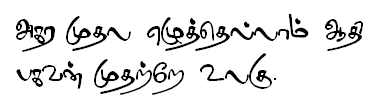



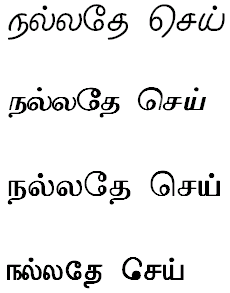
More sample texts with additional information can be viewed by visiting the links below:
Note: Sample texts for a few fonts are only shown in this page. Otherwise, you can download more than 300 fonts by following the appropriate download links in this page. And, using font converters available at indic.php, you can convert texts generated in Tscii/Unicode/etc. to Tab/Tam/etc. (and vice-versa) and thus utilise ALL the fonts downloaded by you from this page. How to install the downloaded fonts? In case you are new to computers and do not know how to install the Tamil fonts you download, then follow instructions below, which are for Windows XP operating system. The instructions for other operating systems are not given, as they are almost similar. After saving or extracting (if the font is inside an archived file - .zip, .deb, .tgz, etc. - to extract files from '.tgz' archives, you can use Winzip; to extract files from '.deb' archives, you can use 7zip) the font to a folder of your choice in your system, you can opt to do one of the following.
Important note: Click here to read an important note on monolingual fonts, bilingual fonts, multilingual fonts, dual encoded fonts, etc. Download Azhagi's 'Sai' fonts ("Tscii" encoding)
SaiVrishin.ttf - Tscii encoding SaiIndira.ttf - Tscii encoding Sai-Sai.ttf - Tscii encoding SaiEmbed-forPDF.ttf - Tscii encoding SaiMeera.ttf - TAB encoding
a) Thanks to (late)Mr. P.S. Ranganathan (alias Kadugu, a great humour writer) for developing the exquisite 'Sai' Tscii fonts for Azhagi. He is the one who has developed the beautiful Tscii fonts shown at the end of this page (porunai, pothigai, etc.) too.
b) If you are using any of the above Tscii encoded fonts for creating your PDF documents, kindly always use SaiEmbed-forPDF font for creating the same. c) Tscu_SaiIndira unicode font was created by me using 'SaiIndira' font's characters as the base. 'Tscu' indicates the fact that it is a 'Tscii cum unicode' dual encoded font. d) Click here to read an important note on monolingual fonts, bilingual fonts, multilingual fonts, dual encoded fonts, multi encoded fonts, etc. Dotted/Tracing Tamil Fonts - Sample screenshots

I suggest you view many more videos of the above kind (200+ of them) by visiting the following links, FOR SURE, so that you can utilise very many beautiful Tamil fonts and create very many great and wonderful graphics stuff, to your heart's content, deriving utmost satisfaction and happiness. |
Other software incl. Tamil fonts converters
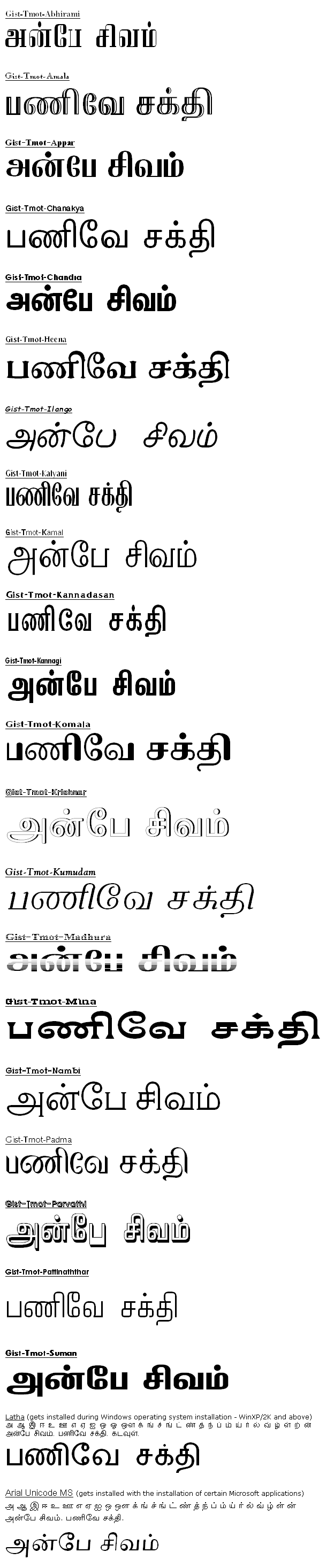
As you keep downloading the 100s of free Tamil fonts (some of them very stylish too) listed above, kindly see indic.php also - this page hosts a comprehensive list covering very many softwares and online tools available for computing in Tamil and various other Indian languages (including Tamil fonts converters, Tamil-English dictionary, English-Tamil dictionary, Text-to-speech engines, etc. etc.). Kindly also read spread.php to see what best you can do to spread the news of Azhagi and all softwares of its kind, for the benefit of the global society.More samples of free fonts ("Unicode" encoding)
Kadugu sir's Super 7 "Tscii" fonts (Sampe texts)
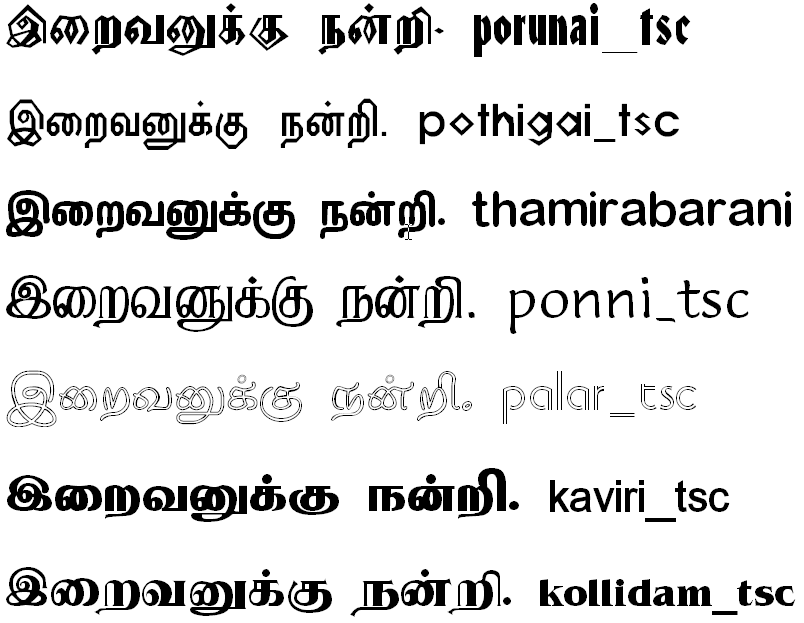
Note: Sample texts for a few fonts (Unicode and Tscii) are only shown above. Otherwise, you can download more than 1000 differently styled fonts by following the appropriate download links in this page. And, using Azhagi's Font Converter (tamil-fonts-converter.php) or any other converter mentioned at indic.php#fconverters, you can convert texts generated in Tscii/Unicode/etc. to Tab/Tam/etc. (and vice-versa) and thus utilise ALL the fonts downloaded by you from this page.