
 Azhagi Facebook Group

keyboard
Azhagi's Malayalam transliteration scheme — English-to-Malayalam phonetic mappings
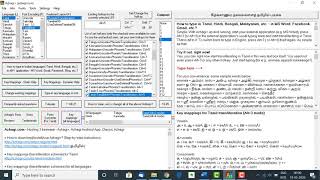
If you wish to, you yourself can change any of the key mappings, to suit your own individual preferences
If you wish to, you yourself can change any of the key mappings, to suit your own individual preferences
Azhagi's Malayalam Transliteration Scheme's Key Mappings
Malayalam can be typed (via transliteration) using Azhagi, following the English to Malayalam transliteration scheme (i.e. English-to-Malayalam key mappings for phonetic transliteration) given below.
For any doubts on the above key mappings, please feel free to contact ardent user-wellwisher shri. Gopalan. He would help you out. His support to you will be 100% free, at all times. His email and phone number are given at free-support-for-azhagi-regarding-shri-gopalan-sir.php
Alternatively, you can also join Azhagi's facebook group (facebook.com/groups/Azhagi) and post your queries therein. For full details on help/support, please see contacts.php.
Malayalam can be typed (via transliteration) using Azhagi, following the English to Malayalam transliteration scheme (i.e. English-to-Malayalam key mappings for phonetic transliteration) given below.
| Note |
| x, X and ` [character under '~' in English keyboards] are used as modifiers and/or splitters |
| Chillu forms |
| ന് = nx, ണ് = Nx, ര് = rx, ല് = lx, ള് = Lx, ൿ = kx |
| Vowels |
|
അ = a, ആ = aa/A, ഇ = i, ഈ = ee/ii/I, ഉ = u, ഊ = oo/uu/U എ = e, ഏ = ae/E, ഐ = ai, ഒ = o ഓ = oa/O, ഔ = au/ou/ow അം = aM/amx, അഃ = aH, ഋ = rux ൠ = Rux, ഌ = lux, ൡ = Lux |
| ക് + vowels |
|
ക = ka, കാ = kaa/kA, കി = ki, കീ = kee/kii/kI, കു = ku, കൂ = koo/kuu/kU കെ = ke, കേ = kae/kE, കൈ = kai, കൊ = ko, കോ = koa/kO, കൌ = kau/kou/kow കം = kaM/kamx, കഃ = kaH, കൃ = krux |
| Consonants |
|
ക = ka, ഖ = Ka/kha, ഗ = ga, ഘ = Ga/gha, ങ = `ga ച = ca/cha, ഛ = Ca/Cha, ജ = ja, ഝ = Ja/jha, ഞ = `ja ട = Ta, ഠ = Tha, ഡ = Da, ഢ = Dha, ണ = Na ത = ta, ഥ = tha, ദ = da, ധ = dha, ന = na പ = pa, ഫ = Pa/pha, ബ = ba, ഭ = Ba/bha, മ = ma യ = ya, ര = ra, ല = la, വ = va/wa ശ = sha/Sa, ഷ = Sha, സ = sa, ഹ = ha ള = La, ഴ = za/zha, റ = Ra, ക്ഷ = ksha/xa, ജ്ഞ = j`ja |
Changeable key mappings – Add, Modify, Delete key mappings
Azhagi's key mappings are fully changeable, easily. All the key mappings you find in this page are 100% editable and customisable. In other words, you can EASILY effect "Add/Modify/Delete" actions on the key mappings given by me.
Clear-cut details and steps are present in changecreate.php page, to effect the abovesaid "add/modify/delete". In fact, you can create "your own" brand new mappings file too, with "your own" preferred key mappings. Free Support - over phone, whatsapp, email, etc. If you need help in customising the mappings, you can opt to call over phone, whatsapp or email Shri. Gopalan sir. He would help you out. Gopalan sir's help to you will be 100% free, at all times. Please see this page for details (Gopalan sir's phone number, email, etc.) |
| Conjuncts (Consonant Clusters) |
|
The consonant conjuncts get formed automatically as you keep typing your words. For e.g. അമ്മ = amma, സക്തി = sakti, ആര്യാ = aaryaa സ്രി = sri, ബ്രഹ്മാവു = brahmaavu, രാഷ്ട്രിയ = raaShTriya മല്ലി = malli, ദ്വനി = dvani, വഹ്നി = vahni, etc. etc. |
| Numerals |
|
൧ = 1x, ൨ = 2x, ൩ = 3x, ൪ = 4x, ൫ = 5x ൬ = 6x, ൭ = 7x, ൮ = 8x, ൯ = 9x, ൦ = 0x |
| x, ` and X modifiers |
|
For any doubts on the above key mappings, please feel free to contact ardent user-wellwisher shri. Gopalan. He would help you out. His support to you will be 100% free, at all times. His email and phone number are given at free-support-for-azhagi-regarding-shri-gopalan-sir.php
Alternatively, you can also join Azhagi's facebook group (facebook.com/groups/Azhagi) and post your queries therein. For full details on help/support, please see contacts.php.
Changeable key mappings – Add, Modify, Delete key mappings
Azhagi's key mappings are fully changeable, easily. All the key mappings you find in this page are 100% editable and customisable. In other words, you can EASILY effect "Add/Modify/Delete" on the mappings given by me in this page. i.e. you can:
- Add extra mappings to the ones I have given
- Modify the mappings given by me
- Delete the mappings given by me.
Clear-cut details and steps are present in changecreate.php page, to effect the abovesaid "add/modify/delete". In fact, you can create "your own" brand new mappings file too, with "your own" preferred key mappings.
- Add extra mappings to the ones I have given
- Modify the mappings given by me
- Delete the mappings given by me.
Clear-cut details and steps are present in changecreate.php page, to effect the abovesaid "add/modify/delete". In fact, you can create "your own" brand new mappings file too, with "your own" preferred key mappings.
- Free Support - over phone, whatsapp, email, remote apps, etc.
In case you are not tech-savvy enough to customise the mappings yourself, you can opt to call over phone, whatsapp or email Gopalan Padmavathy sir. He would help you out (even over remote software like AnyDesk, TeamViewer etc., if you wish to). Gopalan sir's help/support to you will be 100% free, at all times. He provides his help voluntarily, without expecting anything at all in return. Please see free-support-for-azhagi-regarding-shri-gopalan-sir.php for details (Gopalan sir's phone number, email, etc.).
- Help from your near/dear
In case you do not want to contact Shri. Gopalan sir, you can take help from your tech-savvy near/dear/contacts too. In case you are tech-savvy yourself, well and good. You can customise the mappings yourself. 😊