
Tamil Fonts - Tamil Word Processor - Free Download - Azhagi - Everybody's Cup of Joy Azhagi - Everybody's Cup of Joy - Since 2000 ...

Azhagi - The Leading Tamil Word Processor, delivering State-of-the-art Tamil Transliteration, since year 2000.

Easiest, Fastest, Friendliest, Simplest, Most Flexible, Most Natural, Most Intuitive, Sophisticated, Innovative, Versatile, Unique and Peerless.

We are humbly proud to say that ever since its inception in year 2000 uptil this date, Azhagi's transliteration scheme (compared to that of any other's you might name) has remained the most natural and most intuitive and in other words the easiest and fastest, working across ALL Windows applications. It is unrivaled in being 100% phonetics-compliant and is unmatched in it's innovativeness, speed, flexibility and ease of use.


Our
Clientele
Media
Reports
Buy
Online
Buy
Offline
Contact
Us

You are "Free to Try" the professional version of Azhagi with NO LIMITATIONS, whatsoever. But, if you continue to use it, you have to make payment for it. The terms and conditions on which one has to make payment is different for individuals (or NPOs) and business entities which has been explained below.

 Payment by Individuals or NPOs 
If you are an individual using the 'free-2-try' Professional version of Azhagi for your own personal (non-commercial) needs or if you are an NPO using the aforesaid version of Azhagi for your 'not-for-profit' related works, you shall pay for using the aforesaid version of Azhagi at any time you wish. But, if you are well in a position to afford, kindly please pay sooner than later. You can ofcourse take a bit of your time to read the story of Azhagi since 2000 (Innovative, despite odds - a related story in 'The Hindu') before you make your payment. And, when you pay, we are sure you will be happy for the single reason that you will be paying for using the "best" of Tamil transliteration softwares.

We are humbly proud to say that ever since its inception in year 2000 uptil this date, Azhagi's transliteration scheme (compared to that of any other's you might name) has remained the most natural and most intuitive and in other words the easiest and fastest, working across ALL Windows applications. It is unrivaled in being 100% phonetics-compliant and is unmatched in it's innovativeness, speed, flexibility and ease of use. Azhagi is easily the Easiest, Fastest, Friendliest, Simplest, Most Flexible, Most Natural and Most Intuitive Tamil Transliterator, leaving it Peerless. It has many Unique and Innovative features. Its Sophisticated and Versatile. For more details on the aforementioned aspects of Azhagi, please read easy.azhagi.com and docs.azhagi.com.

Have a look at the following too:
Our Clientele FREE Version Download Highlights Product Versions
Media Reviews Commercial Version Download Features Pricing Details
Our Societal Support Free Fonts Download Unique Features Payment Modes

Well, when you are taking your time to make payment for Azhagi, if you feel like, you may kindly please opt to do the following, for creating awareness of 'computing in Indian languages' amongst the general public:

 Payment by Business Entities 
If you are a business (whatever be the type of business you do) entity, you can use the free-2-try professional version of Azhagi for evaluation purposes for a few days (say a week, at the most). If you wish to continue to use it beyond the evaluation period, you are legally bound to make payment and register the fully-licensed 'Professional' version.

We are humbly proud to say that ever since its inception in year 2000 uptil this date, Azhagi's transliteration scheme (compared to that of any other's you might name) has remained the most natural and most intuitive and in other words the easiest and fastest, working across ALL Windows applications. It is unrivaled in being 100% phonetics-compliant and is unmatched in it's innovativeness, speed, flexibility and ease of use. Azhagi is easily the Easiest, Fastest, Friendliest, Simplest, Most Flexible, Most Natural and Most Intuitive Tamil Transliterator, leaving it Peerless. It has many Unique and Innovative features. Its Sophisticated and Versatile. For more details on the aforementioned aspects of Azhagi, please read easy.azhagi.com and docs.azhagi.com.

Have a look at the following too:
Our Clientele FREE Version Download Highlights Product Versions
Media Reviews Commercial Version Download Features Pricing Details
Our Societal Support Free Fonts Download Unique Features Payment Modes


 Benefits acquired by making payment 

Note: To know the pricing and payment modes, please always visit azhagi.com/price.html and azhagi.com/paymodes.html resp. To know the full registration procedure, please visit azhagi.com/register.html.

  • You will get an activation code (password) so that you can register Azhagi with the same and become a fully licensed user of the professional version of Azhagi.

  • Once you have registered Azhagi with your password, no pop-up screens will appear at the closure of Azhagi application.

  • You can avail full technical support over phone (between 10am to 6pm IST) and over email (betweeen 10am to 10pm IST).

  • Right now, the password we give you will have to be reset whenever you format your system but new password will always be given immediately (between 10am and 10pm IST, over email or phone) on request at such instances. Anyway, we are working on a modality (it will be probably ready by Feb 2009) by which you can use Azhagi in any machine at any time, once you have made payment - without the hassles of obtaining new password whenever you format your system or change your machine. The details of this modality and its license terms, once ready, will be posted in this very page. So, please do keep watching.


 Features of the free-2-try Professional version 
FEATURES
Professional
Version
(Free-2-Try)
Dual Screen Transliteration - Snapshot and details y
Single Screen Transliteration - Snapshot and details y
Email in Tamil. One-click instant button to send your emails thru Outlook Express etc. y
Create Tamil documents in universally readable RTF format y
Read your Tamil documents from MS-Word y
Print your Tamil documents from MS-Word y
Mixed Text typing (i.e. English and Tamil texts intermixed) y
Copy/Paste your Tamil text to any external application (MS-Word, Pagemaker etc.) y
Save your English and Tamil texts in two SEPARATE documents respectively and print/distribute/email them y
Keymappings summary floaters - vertical (always-on-top), horizontal (either contained or always-on-top) y
Change English-to-Tamil keymappings of letters like 'z', 'nj', 'ng' etc. y
Text formatting and alignment. Option to set start-up font size, color etc. y
Learner's keypad to teach/learn Tamil easily, along with pronunciation tips y
Use backquote character as mey-uyir separator y
Change keyboard layout from 'Phonetic' to 'Tamil Typewriter' or 'Tamilnet99' y
Unicode Editor** (in-built) - you can type/email/print your Unicode text (OR) copy/paste it to any external application/window like Wordpad, Outlook Express, Blogs, Google/Yahoo Email Message windows etc.
In this in-built separate editor for Unicode, only phonetic keyboard layout can be availed.
y
Unicode conversion** of your plain Tamil texts (in Tscii - generated in Azhagi or pasted from external source) y
Find your Tamil text by typing in English (rather tanglish) itself, during 'Dual Screen' Transliteration y
Word Count (on both Tamil and English texts) y
Type Tamil numerals y
Show recent files accessed y
Choose a favorite folder to access/save your Azhagi files y
Comprehensive, exhaustive Help documents y
Direct Tamil Input in ANY Windows application in Tscii - Snapshot and details y
'Search & Replace' on both Tamil and English Text during 'Single Screen' Transliteration y
Direct Unicode* Tamil Input in ANY Windows application - Snapshot and details
  • your recipients (using Win XP/2K/2k3/Vista) do not require any prior font installation at their end to read your Unicode Tamil docs, mails, chats etc.
  • you can do 'Direct Tamil Input' in Word, Excel, Access etc. including IE Webforms, Blogs, Google Search and kind, without setting any Tamil font to start with. Font will be automatically chosen and set.
  • you can have the names of your Files and Folders in Tamil.
  • you can do Find & Replace in Tamil directly in MS-Word, Excel, Powerpoint, Access, Notepad etc.
  • you can do Sorting in Tamil (arranging Tamil texts in ascending/descending order) in MS-Excel, MS-Word tables, MS-Access etc.
  • you can do Data Filtering in Tamil in MS-Excel.
  • you can search in Tamil in google, yahoo!, msn etc. for e.g. click here
  • you can have your own personal blogs to opine your views in Tamil. for e.g. see mindpower
  • you can have online groups to share your thoughts in Tamil. for e.g. see illam
  • you can have your MP3 Songs list in Tamil in Windows Media Player etc.
y
Unicode conversion** of Tscii HTML texts and files (*.html, *.text, *.js)
Unicode Bulk conversion** i.e. convert multiple files at the same time, from Tscii to Unicode
y
Dynamic Tamil Web Font (both Tscii and Unicode compliant), to create your own Tamil website. See a sample site here. Click here for more details on procuring and using our dynamic font. y
Chat in Tamil in Yahoo! Messenger, MSN Messenger, Google Talk etc. y
Reverse Transliteration - i.e. Type/paste in Tamil, get in transliterated English (i.e. in tanglish). You can reverse transliterate only Tscii Tamil texts, as of now. Click here for snapshot and click here for more details. y
Auto'Transliteration - Transliterate your existing English texts (in MS-Word docs, Excel docs, Text fles, Web pages etc.) into Tamil in quick time. No need to retype your Tanglish texts to generate the Tamil equivalent. Click here for snapshot and click here for more details. y
Popup Transliteration - Transliterate and display a line/portion/whole (max. 4000 chars) of the text of an external document you are currently viewing (say an Ms-Word document), in a separate pop-up window (in Tscii, as of now) y
Auto'Insertion - Insert user-defined Tamil texts/paragraphs (e.g. 'murugan thunai', 'dear thambi', bharathiar poems, couplets from thirukkural, addresses, etc.) in any Windows application, using hotkeys. The user-defined texts can be in Tscii only, as of now. y
Conversion of your plain Tamil Text (in Tscii) to TAB encoding y
(*) Direct Unicode Input is possible in any external application which supports Unicode - like Wordpad, Outlook Express, Internet Explorer, Notepad, MS-Word, Excel, Powerpoint etc. Without enabling Unicode fully, 'Direct Unicode Input' in external applications may be possible only in certain applications like Wordpad, Outlook Express and Internet explorer. So, for other applications like MS-Word etc., Unicode might have to be enabled fully. To get to know more details on enabling Unicode and typing in Unicode, please visit azhagi.com/uniset.html. Please note that in Windows Vista operating system, Unicode gets automatically enabled FULLY, along with the OS installation.

(**)
1. To type in Unicode in Azhagi's in-built Unicode editor, you may not be required to enable Unicode fully. Azhagi's in-built Unicode editor may work in most Win98 systems too. Once you have generated Unicode Tamil text using Azhagi's in-built Unicode editor, you can copy/paste the Tamil text to any external application/window like Wordpad, Outlook Express, Blogs, Google/Yahoo Email Message windows etc. If the pasted text does not appear correctly in certain applications like MS-Word, Notepad etc., then Unicode might have to be enabled fully. To get to know more details on enabling Unicode, please visit azhagi.com/uniset.html. Please note that in Windows Vista operating system, Unicode gets automatically enabled FULLY, along with the OS installation.

2. To effect Unicode conversion, you have to navigate to "File->Convert to Unicode" from within Azhagi. To effect Unicode conversion, you may not be required to enable Unicode fully. Once you have generated Unicode Tamil text using Azhagi's Unicode Converter, you can copy/paste the Tamil text to any external application/window like Wordpad, Outlook Express, Blogs, Google/Yahoo Email Message windows etc. If the pasted text does not appear correctly in certain applications like MS-Word, Notepad etc., then Unicode might have to be enabled fully. To get to know more details on enabling Unicode, please visit azhagi.com/uniset.html. Please note that in Windows Vista operating system, Unicode gets automatically enabled FULLY, along with the OS installation.

Azhagi - Unique and Unrivaled - Your Easiest Tamil Transliteration Software Azhagi - Unique and Unrivaled - Your Easiest Tamil Transliteration Software
  • Kindling Humaneness
    Mind Power 1983
    Mazhalaigal dot com

  • Enabling Unicode
    If Tamil characters do not appear properly in the above blog/site, it means you have not yet enabled Unicode fully in your system. To get the know-how, click here

  • Why Unicode?
    • Unicode is sheer power
    • Recipients (using Win XP/2K/2k3/Vista) do not require any prior font installation at their end to read your Tamil docs, mails, chats etc. sent in UNICODE.
    • You can search in Tamil in google, yahoo!, msn etc. for e.g. click here
    • You can have your own personal blogs to opine your views in Tamil. for e.g. see mindpower
    • You can have online groups to share your thoughts in Tamil. for e.g. see illam

  • Powerful benefits in enabling Unicode
    • Files and Folder names in Tamil.
    • Data Filtering in Tamil in Excel.
    • Sorting in Tamil in Excel, Access, Word etc.
    • Find & Replace in Tamil in Word, Excel, Notepad etc.
    • MP3 Songs list in Tamil in Windows Media Player etc.
  • Sites using Azhagi Dynamic Web Fonts
  • Azhagi has provided dynamic Tamil web fonts for many sites. A few of these sites have been mentioned below.
  • Please note that our dynamic fonts are both Tscii and Unicode Compliant. i.e. in the same font (SaiIndira) style, you can have your web pages either in Tscii or in Unicode.

    For further details on our dynamic Tamil web fonts, click here
  • What users say on Azhagi?
  • Azhagi receives appreciative e-mails continuously from various quarters, across the globe. Just a few samples out of these have been posted below. To read more comments of this kind, click here.

    • Ramesh Sadasivam, Chennai
      Greetings to the creators of Azhagi!

      Your software was very useful to me. Using Azhagi, I have typed and uploaded my songs on the divine in my blog. You have made Tamil typing very simple. Your efforts are laudable. My hearty congrats. I pray Lord Almighty that your service takes Tamil to the people, world over.

    • Anselm T Francis, Dubai
      I am really impressed with 'Azhagi'.

      Recently, I translated our Vicariate of Arabia's Bishop's Lenten letter into Tamil and got it printed 10,000 copies and distributed to our less privileged brethren who cannot read or write English.

      I am thankful for this product which makes things so easy for me. You deserve the accolades & awards you have received. May God bless you with good health and long life to continue your good work.

    • S Abdul Kadir, Singapore
      I congratulate you for your efforts in bringing Tamil as the "Living Language" forever. I wish Azhagi spreads its wings and becomes the most popular in every Tamilian's house.
  • Pricing and Payment
  • To know the current pricing details of Azhagi, please always visit azhagi.com/price.html.

    Details on all the available payment modes are as follows:
    • You can "pay online" through your:
      1. Credit Card 
      2. Debit Card 
      3. ItzCash Card 
      4. Mobile Phone 
      5. Netbanking Account 

      Click here for details on the above modes of payment.

    • You can "pay offline" through:
      1. Cheque
      2. Demand Draft
      3. Money Transfer
      4. Money Order
      5. Cash

      Click here for details on the above modes of payment.
  • Our clientele
    Azhagi's customers are comprised of 1000s of individual users across the globe along with hundreds of corporate / govt / spiritual / service organisations like L&T(LTM), AIR&DD, AG's office, ISKCON, 'Save The Children' etc. For a more comprehensive list, click here
  • Media Reviews
    Various dailies, magazines and webzines (like 'The Hindu', Deccan Chronicle, Kalki etc.) have written on Azhagi. The popular TV Channels (Sun TV, Jaya TV) have interviewed the Author. For more comprehensive details, click here
  • Our Societal Support
    We have contributed our bit for certain extremely challenged yet amazingly talented individuals and a few other service organisations and worthy websites, since 2002. To get to know more details on them so that you can also opt to contribute in one way or other, if you wish to, click here
  • More Tamil softwares
    There are various softwares connected with Tamil (or Indian language computing) which we always feel very proud of, thinking of the developer(s) who developed the same and keep enhancing it with new features. As a mark of our true appreciation of all those developer(s) and their efforts, we have put up a page containing links to their softwares. Click here to visit the same.
  • More Free Tamil Fonts
    Click here to get more free Tamil fonts - in Tscii, Unicode and various other font encodings.

    We take this opportunity to offer our sincere appreciation to all the developers of free Tamil fonts.


 Steps to register the free-2-try Professional version 


 Azhagi's Online Forums 

Please note: All our group messages are moderated and hence you can be rest assured that you won't receive any junk mails. Also, you can always choose 'No Email' or 'Daily Digest' option while joining our groups.

Our Technical Forum - AZHAGI
Join http://groups.yahoo.com/group/azhagi - our online forum. You do this (it is ofcourse free) by entering your email address below and clicking the 'Join Now!' button. It makes great sense to join our group as you will get to know answers to ALL your frequently asked questions on how to Email, Chat, Blog, Document, Print, Publish and Create Tamil websites using Azhagi. You will get up-to-date news on software upgrades, offers, Unicode, Tamil computing, Indian languages computing (Hindi, Malayalam, Telugu, Kannada, ...) etc.

Subscribe to Azhagi online forum
Powered by groups.yahoo.com
If you are used to google, you may also opt to join our Azhagi google group - http://groups.google.com/group/azhagi. You do this by entering your email address below and clicking the 'Subscribe' button. Do join our group(s) and avail the benefits.

Google Groups Subscribe to Azhagi Group
Email:
Browse Archives at groups.google.com


 Azhagi's Transliteration Scheme 

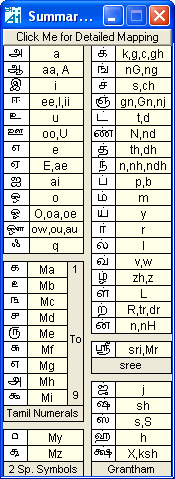
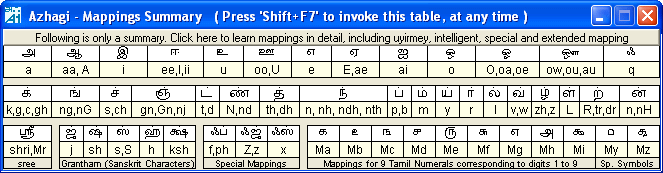
The following tables help you understand the fundamental transliteration scheme (English to Tamil Key Mappings) of Azhagi. Detailed tables explaining modifications / flexibilities of these mappings are available in Azhagi's in-built help documents, which you can get to read online too by clicking any one of the 2 images below and following instructions therein. Please do get to understand all the flexibilities and use Azhagi at her easiest best.


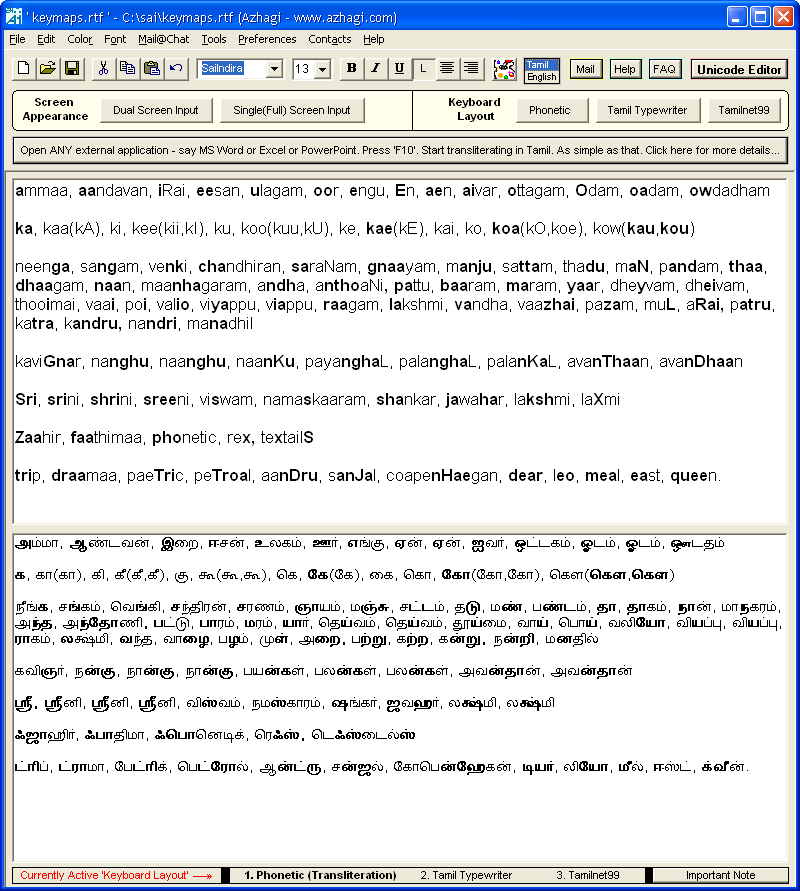
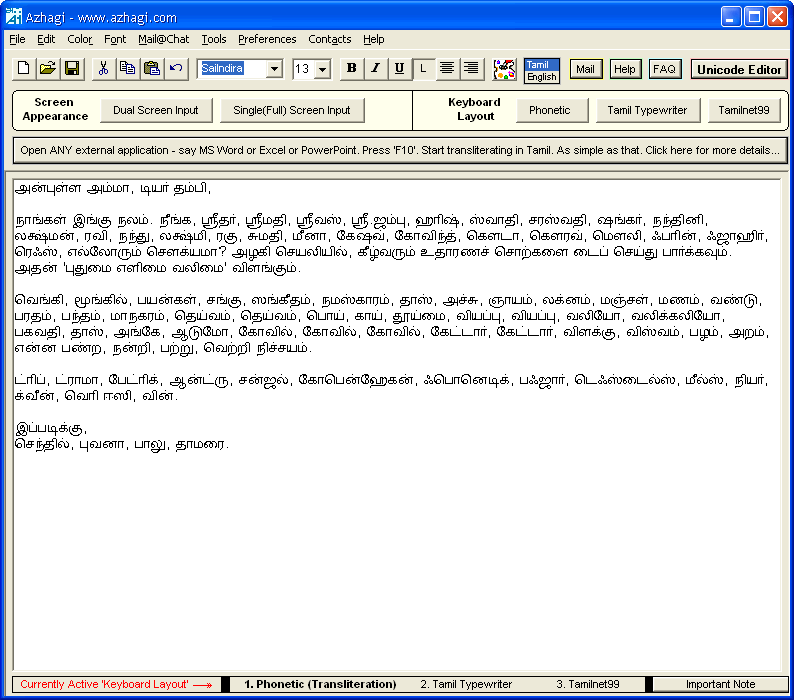
The following screen snapshots show you how you can use Azhagi to type out Tamil texts so easily and flexibly, with the key-mappings changing intelligently (i.e. not being rigid or one-to-one) at certain instances. Clicking on these snapshots will help you to read write-ups (in both Tamil and English) explaining this unique userfriendliness of Azhagi elaborately. To read these write-ups straightaway, see easy.azhagi.com and docs.azhagi.com. Please do get to understand all the flexibilities and use Azhagi at her easiest best.


SRV Consultants, B1, 15-16, New No.28, Gopalakrishna Road. T.Nagar. Chennai - 600017. India.
Phone: 91-44-42024669, 0-98403-39750. Email: contact@azhagi.com

©  2002-2008  SRV Consultants