


 24 languages . Tamil, Hindi, Arabic, etc . Never before seen features . Extendable to type in any Language Font Keyboard . Changeable key mappings . Voice input in Android . And more...

















































language
Type in multiple languages
Transliteration/Typing at it's easiest best - in MS Word, Excel, Whatsapp, Facebook, Twitter, Photoshop, InDesign, PageMaker, etc., - in multiple languages - Tamil, English, Hindi, Arabic, Sanskrit, Telugu, Kannada, Malayalam, Bengali, etc. Multiple keyboards - Phonetic, Inscript, etc.
flash_on
Superfast Tamil transliteration
Superfast transliteration in Tamil via 'அழகி - ஒலிபெயர்ப்பு' keyboard. SHIFT key NOT needed to type ள், ற், ண், ஸ்!!!!! Other Tamil keyboards supported: Alternative transliteration (எழுத்துப்பெயர்ப்பு), TamilNet99, Typewriter, Inscript and Bamini.
star
Never-before-seen features
My Windows freeware are sleek and small, yet power-packed with features, some of them being special or unique - viz. change existing key mappings, create your own new keyboard layouts, transliterate in ANY Tamil font, etc. You can read all about such unique features here.
get_app
Download Azhagi++ (AzhagiPlusPlus) for Windows
Please read this section fully. Thanks.
Azhagi++ - just loaded with features, incl. 'Unique' ones.
Features list - Click here
Version Number: 1.1.21
Release Date: 23rd Nov, 2023
License: 100% Free
'Tabbed' Interface . 'Focused' (single application) Typing . Specially enhanced 'Direct Typing' in MS Word . 'Hotkey'-less typing . 'Grid'-based typing . 'Floater'-based typing. 'Within MS Word' Tamil Fonts Conversion . 'Sanskrit Tamil' Colorization . 'Auto' Transliteration . 'Reverse' Transliteration . 'Dual Screen' Transliteration . And, much much more....
vertical_align_bottom_laptop_windows
Download Azhagi+
for Windows
Download from Azhagi Free Apps Store
How to install and use?
Features galore - Click here
Version number: 10.45
Release Date: 14th October, 2018
License: 100% Free
16 languages with multiple keyboards, by default. But, you can easily extend Azhagi+ yourself - to type in ANY language-font-keyboard combination.
And, there are some 'optional' downloads too - Classic Azhagi, Portable Azhagi+, Free Fonts - here.
arrow_downward_desktop_mac
Azhagi - For iPhone, MAC, Linux, etc.?
Please do fully read this section.
Azhagi works seamlessly both in MAC and Linux, but only under Parallels or Wine environment. You can read details of the same here.
If you need to use Azhagi directly in MAC and Linux, without the need to install Parallels and/or Wine, then it is not possible, as of now.
There is no version of Azhagi for iPhone, as of now.
get_app
Optional free download 1 - Portable Azhagi+
Please visit steps-portable.php or steps-in-tamil-portable.php to avail your tiny portable Azhagi+
vertical_align_bottom
Optional free download 2 - Classic Azhagi
Please visit oper.php to download classic Azhagi (i.e. old Azhagi) and enjoy it's features.
arrow_downward
Optional free download 3 - Hundreds of fonts
Please visit freefonts.php and unicodeff.php to avail 100s of free fonts in exquisite styles.

16 languages
Tamil, Hindi, Sanskrit, Telugu, Kannada, Malayalam, Marathi, Konkani, Gujarati, Sourashtra, Bengali, Punjabi, Oriya, Assamese, Devanagari, Grantha
Multiple fonts/keyboards support for Tamil
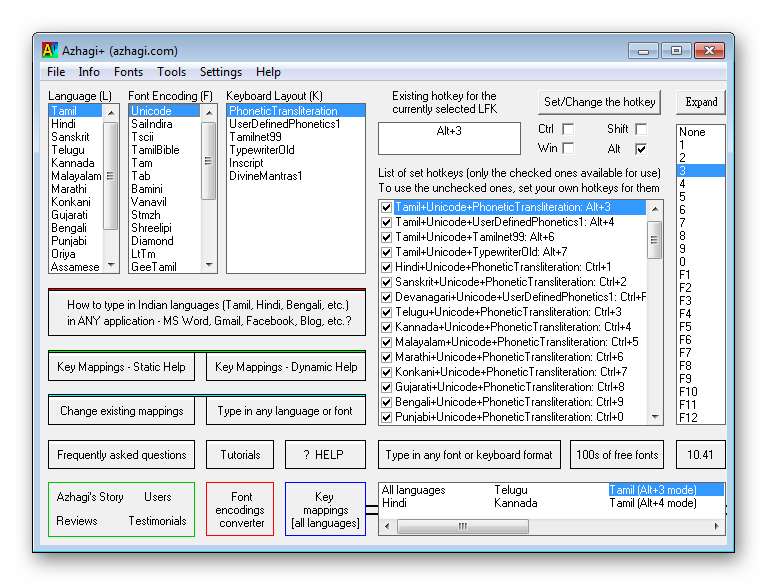
Azhagi+ supports typing in the following Tamil font encodings and keyboard layouts.
Tamil font encodings: SaiIndira, TamilBible, Unicode, STMZH, Vanavil, Shreelipi, LT-TM, Tscii, TAB, TAM, Bamini, etc.
Keyboard layouts: Transliteration, UserDefinedPhonetics, TamilNet99, TamilTypewriterOld, Inscript, etc.
Synopsis
Azhagi+ is a supremely easy, fast, unique and feature-rich transliteration software. Primarily it helps one to type in 16 Indian languages* but it is easily extendable by the user himself or herself to type in any other language of the world too. Typing can be effected directly in any Windows application (MS Word, Facebook, WhatsApp, Quora, SMS, Gmail, Google Docs/Sheets/Slides/Forms/Etc., Twitter, Instagram, PhotoShop, PageMaker, InDesign, CorelDraw, Skype, Excel, PowerPoint, LibreOffice/OpenOffice Writer/Calc/Forms/Impress/Etc., etc., etc., etc.) by the simple press of an hotkey.
Azhagi+ is sleek and portable. It is very small (less than 1 MB) yet power-packed with innovative features.
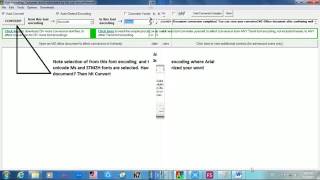
Azhagi+ has possessed the fastest of all Tamil transliteration schemes, ever since its inception in 2000. You can quickly extend Azhagi+ to transliterate in any Tamil font by using a never-before-seen feature. You can easily extend Azhagi+ to type in any language+font+keyboard combination by availing a very special feature. You can very well change the existing key mappings, have custom hotkeys to toggle between languages, utilise an in-built font viewer, avail a first of its kind Tamil font converter which is extendable by the user himself/herself and do much more...
(*) Tamil, Hindi, Sanskrit, Telugu, Kannada, Malayalam, Marathi, Konkani, Gujarati, Bengali, Punjabi, Oriya, Sourashtra, Assamese, Devanagari and Grantha. Multiple font encodings and keyboard layouts are supported for Tamil.
Wikipedia Pages on Azhagi
Wikipedia article on Azhagi - in English
Wikipedia article on Azhagi - in Tamil
Wikipedia article on Azhagi's author - in Tamil
What's so unusual about Azhagi?
Click here to read all about the unique and special features of Azhagi and Azhagi+

Azhagi Facebook Group & Page
The best way to contact me is through Azhagi Facebook Group. It is a public group. So, anybody can read the group's contents even without joining it. However, to post your queries, you have to join the group.
'Azhagi Facebook Group' is not only a dedicated support forum for Azhagi but an informational forum too - on Azhagi and other Indic softwares.
There exists Azhagi Facebook Page also. However, to get your queries answered, kindly always post your queries in Azhagi Facebook Group only. I will promptly help you out. Support (too) is 100% free! :)
Frequently Asked Questions (FAQ)
The helptips.php page answers very many frequently asked questions by users (e.g. How to type in Photoshop/PageMaker/etc.?, How to type in MAC/Linux?, F10 key is not working in laptop - What to do?, How to type க்ஷ்?, How to type subscripts/superscripts?, How to publish books in Tamil?, How to effect reverse transliteration?, How to do inter-language transliteration?, etc.)